
Computer Fundamentals: How a Computer Turns Data into Information
Learn what a computer is and what makes it useful, how the input–process–output–storage cycle turns raw data into information, what the ALU, control unit and registers inside the CPU each do, and how hardware, software and firmware differ, through worked exam-style questions, a side-by-side table of look-alike terms and a revision list.
By the end of this lesson you will be able to say what a computer is, follow how it turns raw data into useful information, name the part of the CPU that does each job, and sort any program into system software, application software or firmware. The core idea is short: a computer is an electronic device that can be programmed to accept data (input), process it and produce a result (output), keeping data and instructions in memory and storage along the way. Learn which part of that cycle, and which part of the machine, does each job.
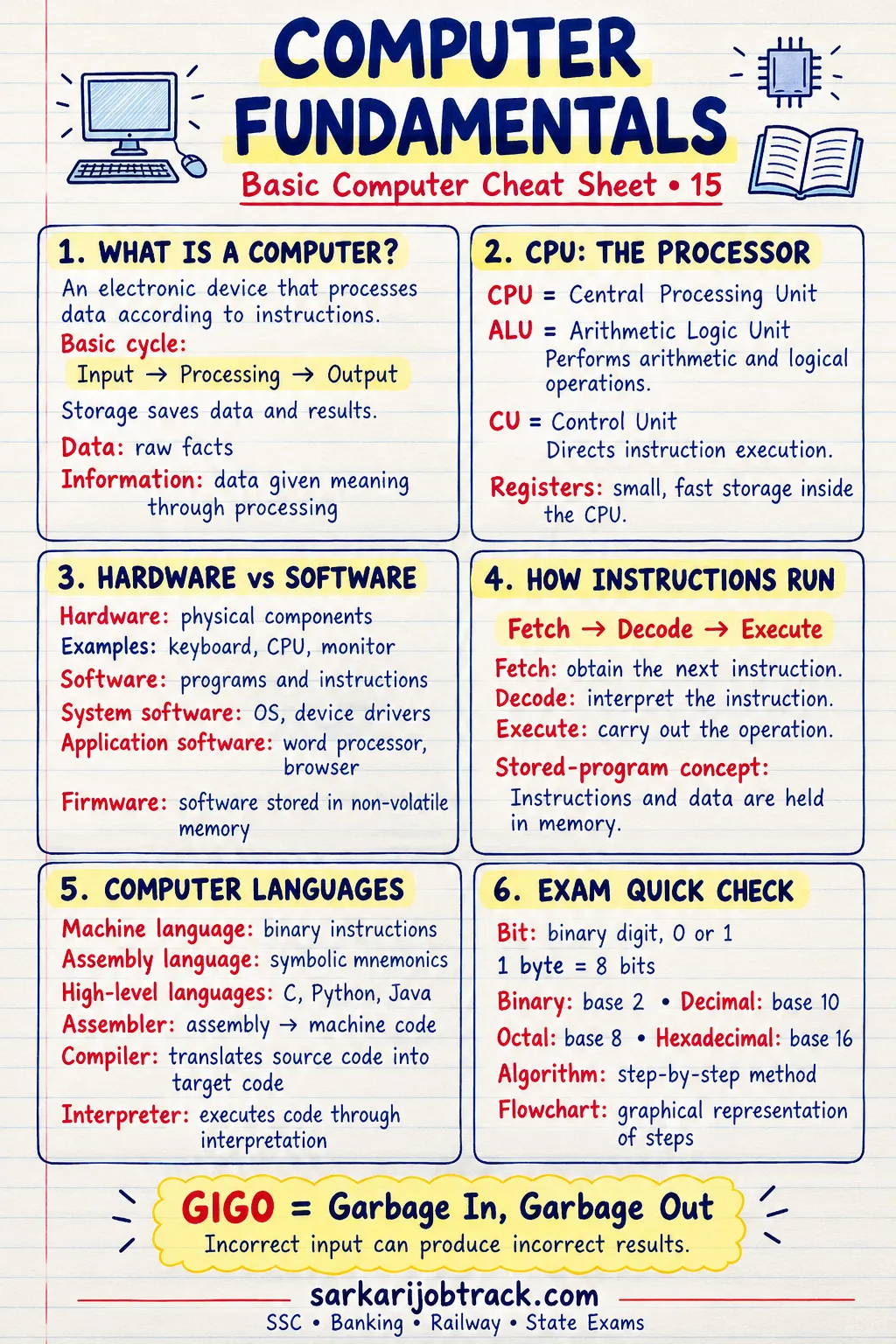
Short on time? Revise with the Computer Fundamentals cheat sheet
Already confident? Skip to practice: Computer Fundamentals quiz
What a computer is
NCERT's Class 11 Computer Science textbook defines a computer as "an electronic device that can be programmed to accept data (input), process it and generate result (output)". A computer together with the extra hardware and software it needs is a computer system, made up mainly of a central processing unit (CPU), memory, input and output devices, and storage devices.
Two words in that definition carry most of the weight:
- Programmed. A computer follows a program: an ordered set of instructions to be carried out by the computer to do a specific task. The language those instructions are written in is a programming language.
- Data. A computer treats everything it handles as data, whether instructions, pictures, songs or documents. Inside the machine all of it is stored in binary, as the digits 0 and 1. Each 0 or 1 is a bit; a group of 8 bits is a byte.
Characteristics of a computer
These are the qualities listed in NCERT's vocational Class XI textbook. A question may describe one and ask you to name it.
- Speed. It processes data at millions of instructions per second, so work that takes hours by hand takes seconds.
- Accuracy. It carries out complex arithmetic and logical work accurately.
- Automation. Once the data and instructions are in its memory, it finishes the task without a person stepping in.
- Programmability. It runs a set of instructions, and the program can be changed for a new task.
- Storage. It keeps large amounts of data permanently and fetches them whenever needed.
- Diligence. Being a machine, it works consistently for long hours without a break, and does the last calculation with the same speed and accuracy as the first. In plain words: it does not tire.
- Versatility. It does very different kinds of work with equal ease: a letter one moment, music the next.
A computer also has limitations. It has no emotions, knowledge or experience, and it cannot make its own decisions; it only does what its instructions say. That gives a term you must know: GIGO, "Garbage In, Garbage Out". A computer gives a correct result only if the data and instructions it receives are correct. If a clerk types 46 instead of 64 for one student's marks, the computer will print a wrong class average, and the fault lies in the input, not the machine.
Example 1: Naming the characteristic
Question: An office computer types a letter, then plays a song, then prints a sales chart, all within a few minutes. Which characteristic does this show? Options: (A) Diligence (B) Versatility (C) Speed (D) Accuracy
- Read what the computer is doing: three different kinds of job, one after another.
- Doing many different kinds of task is versatility.
- Do not be pulled to (A): diligence is the same work for long hours without a break.
Answer: (B) Versatility.
The principle: many different tasks means versatility; the same task for hours without a break means diligence.
The input–process–output–storage cycle
A computer mainly performs four functions:
- Input. The input unit accepts data and instructions from the user and converts them into a form the computer can understand (a digital form). Input devices include the keyboard, mouse, scanner and touch screen.
- Process. The CPU works on the data: it calculates, compares, edits. While it works, the data, instructions and results are held for the time being in main memory.
- Output. The output unit converts digital information into a form people understand. Output devices include the monitor, printer, speaker, headphones and projector.
- Storage. The data, instructions and output can be kept permanently in secondary storage, such as a hard disk, and retrieved whenever needed.
The direction of flow is the whole test. A device that brings something into the computer is input; one that brings a result out to you is output. A scanner reads a paper page into the computer, so it is an input device.
Example 2: Which unit?
Question: A clerk types a student's marks on the keyboard. Which unit takes in these keystrokes and converts them into a digital form the computer can use? Options: (A) Input unit (B) Output unit (C) Arithmetic Logic Unit (D) Storage unit
- The marks are coming into the computer from the user, and the keyboard is an input device. That is the first step of the cycle.
- Taking data in and converting it into digital form is the job of the input unit.
- (B) does the reverse: the output unit converts digital information into a form people understand. (C) works on the data only after it is inside, and (D) keeps it for later.
Answer: (A) Input unit.
The principle: match the verb to the stage. Accepts is input, processes is the CPU, presents or displays is output, keeps for later is storage.
Data and information
Data are raw, unorganised facts. Information is what you get once those facts are processed into a meaningful form. Processing is the bridge between the two. A list of marks, 45, 60, 72, is data. Work out that the class average is 59 and you have information. In a question, raw or unorganised points to data; processed or meaningful points to information.
Organising data: field, record, file
Stored data is organised in layers: field, record, file, database. Quiz questions call this the data hierarchy. NCERT's Class 12 Computer Science textbook shows the same pieces in a school's records:
- A field is one item of data in its own column, such as a roll number, a name or a date of birth.
- A record is all the fields for one item: one student's roll number, name, date of birth and guardian details, in one row.
- A file is a collection of related records. The school's STUDENT file holds one record for every student.
- A database brings related files together. In NCERT's example, the STUDENT, GUARDIAN and ATTENDANCE files become one database.
In a relational database the same layers have other names: a row is a record, a table holds related records, and a database is a collection of tables. When a question says data hierarchy or offers file as an option, a collection of related records is a file.
Example 3: Naming the layer
Question: A school office keeps the roll number, name and date of birth of every student, one record per student. In the data hierarchy, what is this whole set of student records called? Options: (A) Field (B) Record (C) Database (D) File
- Start at the bottom. One roll number, or one name, is a single item: a field.
- All the fields for one student together make one record, so (B) names a single student's row, not the whole set.
- Every student's record, collected together, is a file: NCERT's STUDENT file holds exactly this.
- Do not jump a level to (C). A database is one step higher: it brings related files together, such as STUDENT, GUARDIAN and ATTENDANCE.
Answer: (D) File.
Inside the CPU: ALU, control unit and registers
The CPU (Central Processing Unit) is the electronic circuitry that does the actual processing, and it is usually called the brain of the computer. A CPU built on a single microchip is a microprocessor; almost all CPUs today are microprocessors, so the two words are used to mean the same thing.
The CPU has three parts you must tell apart:
- Arithmetic Logic Unit (ALU). It does all the arithmetic and logic. Its arithmetic side adds, subtracts, multiplies and divides; its logic side makes comparisons, testing whether a value is greater than, less than or equal to another.
- Control Unit (CU). It interprets each instruction (some questions say decodes), keeps instructions running in order, and guides the flow of data between memory, the ALU and the input and output devices. When a calculation is needed, the control unit instructs the ALU to do it; it directs the work rather than doing the arithmetic.
- Registers. They are the CPU's own small, high-speed memory, part of the CPU chip. They hold the data, instructions and intermediate results being worked on at that moment.
Watch them work on one sum. To add two numbers, both are brought into registers, the ALU adds them, and the result is placed in a register. The control unit decided that this should happen, and in what order.
The stored-program idea
How does the CPU know what to do next? John von Neumann introduced the concept of the stored-program computer, which stores the program and the data together in memory. The CPU fetches the program and data from memory, carries out the arithmetic and logic operations the instructions ask for, and stores the result back in memory. NCERT's vocational textbook describes the basic working model of a computer as based on this von Neumann architecture. Do not confuse him with Blaise Pascal, Charles Babbage or Herman Hollerith, whose calculating, computing and tabulating machines came before the stored-program idea.
Example 4: Which part of the CPU?
Question: A program must check whether one number is greater than another. Which part of the CPU makes this comparison? Options: (A) Registers (B) Arithmetic Logic Unit (C) Control Unit (D) Input unit
- Testing greater than, less than or equal to is a logic operation, and logic is the second half of the ALU's job.
- (C) is the tempting wrong answer, because the control unit is in charge. It interprets the instruction and instructs the ALU to do the comparison; it does not compare anything itself.
- (A) registers only hold the two numbers while they are being worked on. (D) is not part of the CPU at all.
Answer: (B) Arithmetic Logic Unit.
The principle: the ALU calculates and compares; the control unit interprets and directs; registers hold what is being worked on.
Hardware, software and firmware
Hardware is the physical part of a computer system, the parts you can see and touch: the CPU, RAM, keyboard, monitor, printer.
Software is the set of instructions and data that makes the hardware work; you cannot touch it. Hardware is of no use on its own, and software is the interface between people and the hardware. NCERT sorts software into three groups:
- System software works directly with the hardware to run the computer. It takes in the operating system (Windows, Linux, Android and others), the most basic system software, without which other software cannot work; system utilities, which maintain the computer and keep it performing well (disk defragmenters, formatting tools, antivirus software, disk cleaners); and device drivers, each of which lets the operating system work with one particular device.
- Programming tools help people write programs: programming languages, translators such as the compiler (which converts a program's source code into machine code), and the debugger.
- Application software runs on top of system software and does the work the user wants: a spreadsheet, a photo editor, a web browser, accounting software. MS Excel (a spreadsheet program), Adobe Photoshop and Tally (accounting software) are all application software.
A computer can work without application software, but it cannot be used without an operating system.
Firmware is low-level software built into a hardware device and kept in its non-volatile storage, such as ROM, so it is not lost when the power goes off. A printer, a keyboard and a monitor each have their own firmware, but in a PC its best-known job is starting the computer: when a PC is switched on, the firmware controls the booting process and then passes control to the operating system. The traditional PC firmware is the BIOS (Basic Input Output System), the boot-up program kept in ROM (on today's PCs, a rewritable type called flash). Its newer replacement, UEFI, belongs to the Computer Hardware lesson.
Programs, compiling and debugging
A programmer can make mistakes while writing a program, so it may not run or may give wrong output. These mistakes are called bugs or errors, and debugging is the process of identifying and removing them. It is a different step from compiling, in which a compiler translates source code into machine code, and from executing, in which the computer carries out the translated instructions. Formatting is a separate job again, done by a formatting utility.
Example 5: System, utility or application?
Question: Which of these programs is used to maintain the computer rather than to do the user's own work? Options: (A) Tally (B) Disk cleaner (C) Adobe Photoshop (D) MS PowerPoint
- Ask of each option: does it look after the computer, or does it do the user's own work?
- Software that maintains the computer is a system utility. NCERT names the disk cleaner in exactly this group, alongside antivirus software and the disk defragmenter.
- Tally is accounting software, PowerPoint builds slide presentations, and NCERT lists Adobe Photoshop as application software. All three do the user's own work, so they are applications. The disk cleaner is the only option that looks after the machine itself.
Answer: (B) Disk cleaner.
Now flip it.
Question: A shopkeeper wants a program to keep the shop's accounts. Which of these is the application software for that job? Options: (A) Windows (B) A device driver (C) Tally (D) A disk defragmenter
- Apply the same test: which option does the user's own task?
- Windows is an operating system, a device driver lets the operating system work with one device, and a disk defragmenter is a system utility. All three exist to run or look after the machine, so all three are system software.
- Tally is accounting software: it does the shopkeeper's own work, on top of the operating system.
Answer: (C) Tally.
The principle: runs or looks after the machine → system software (operating system, utility, driver); does the user's task → application software; is built into the hardware itself, in non-volatile storage, like the BIOS that starts a PC → firmware.
Primary and secondary storage, in brief
Main memory (primary memory) holds the programs and data the CPU is working on now, and the CPU reads and writes it directly; secondary storage, such as a hard disk, keeps data permanently.
RAM and ROM, cache, the memory hierarchy and storage units belong to the Memory and Storage lesson; the Memory and Storage cheat sheet summarises them.
Look-alikes, side by side
| These terms | How to tell them apart |
|---|---|
| Data vs information | Data is raw and unorganised; information is processed and meaningful. |
| Hardware vs software vs firmware | Hardware is physical and can be touched; software is instructions and data and cannot; firmware is low-level software built into the hardware and kept in non-volatile storage such as ROM; the best-known example is the BIOS that starts a PC. |
| ALU vs control unit vs registers | ALU calculates and compares; control unit interprets instructions and directs; registers hold the data being worked on. |
| Diligence vs versatility | Diligence: the same work for long hours without a break. Versatility: many different kinds of work. |
| System vs utility vs application | System software runs the machine; a utility is system software that maintains it (antivirus); application software does the user's task (Excel). |
| Compiling vs debugging | Compiling translates source code into machine code; debugging finds and removes errors. |
In the exam
Computer Knowledge is a named module in SSC CGL Tier-II and SSC CHSL, and part of General Awareness in RRB NTPC. Questions on this topic come in a few recognisable shapes:
- "Which unit does this job?" For example, which unit of the CPU carries out arithmetic and logical comparisons, or which unit accepts data and instructions from the user. How to spot it: find the verb. Calculates, compares → ALU. Decodes, directs, controls → control unit. Accepts from the user → input unit.
- "Which of the following is an example of … software?" The blank says system, utility or application, and the options mix an operating system, antivirus, a driver, the BIOS, Excel or Tally. How to spot it: ask whether each option runs or maintains the machine, or does the user's own work.
- "What is the term for …?" A one-line definition: processed, meaningful data (information); a set of instructions telling the computer what to do (program); wrong input giving wrong output (GIGO); removing errors (debugging); repeating a task without tiring (diligence). How to spot it: find the stem word only one option can satisfy, such as processed, instructions or errors.
Common mistakes
- Giving the arithmetic to the control unit. The control unit directs; the ALU calculates and compares.
- Calling a scanner an output device. It reads a page into the computer, so it is input.
- Mixing up diligence and versatility. Same task without a break is diligence; many different tasks is versatility.
- Calling antivirus or an operating system "application software". Both look after the machine, so both are system software.
- Jumping from record straight to database. A collection of related records is a file.
At a glance
- Computer: an electronic device programmed to accept data, process it and produce a result.
- Cycle: input → process → output, with storage keeping data for later.
- Characteristics: speed, accuracy, automation, programmability, storage, diligence, versatility. GIGO: wrong input gives wrong output.
- Data is raw; information is processed and meaningful. Field → record → file → database.
- CPU: the brain of the computer. ALU: arithmetic and comparisons. Control unit: interprets and directs. Registers: small, fast memory inside the CPU.
- Stored-program concept: program and data together in memory; John von Neumann.
- Hardware: physical. Software: instructions and data. Firmware: low-level software built into hardware, kept in non-volatile storage (in a PC: the BIOS or UEFI that starts it).
- System software: operating system, utilities (antivirus), device drivers. Application software: Excel, Photoshop, Tally.
- Program: an ordered set of instructions for a task. Debugging: removing errors (bugs). Binary: 0s and 1s; 1 byte = 8 bits.
- Main memory: what the CPU is working on now, read directly by the CPU. Secondary storage: keeps data permanently.
Next
The next lessons in the Basic Computer series are Computer Generations, Types of Computers and Computer Hardware. Go on to the Computer Generations lesson, the Types of Computers lesson and the Computer Hardware lesson. Every topic in the series is on the Basic Computer page.
Ready to test this lesson? Take the Computer Fundamentals quiz
How this was made: Drafted with AI assistance; every answer re-solved by a separate check that had not seen the key; every fact checked against the source it cites.