
Memory and Storage Cheat Sheet
31 Oct 2026
Quick answer
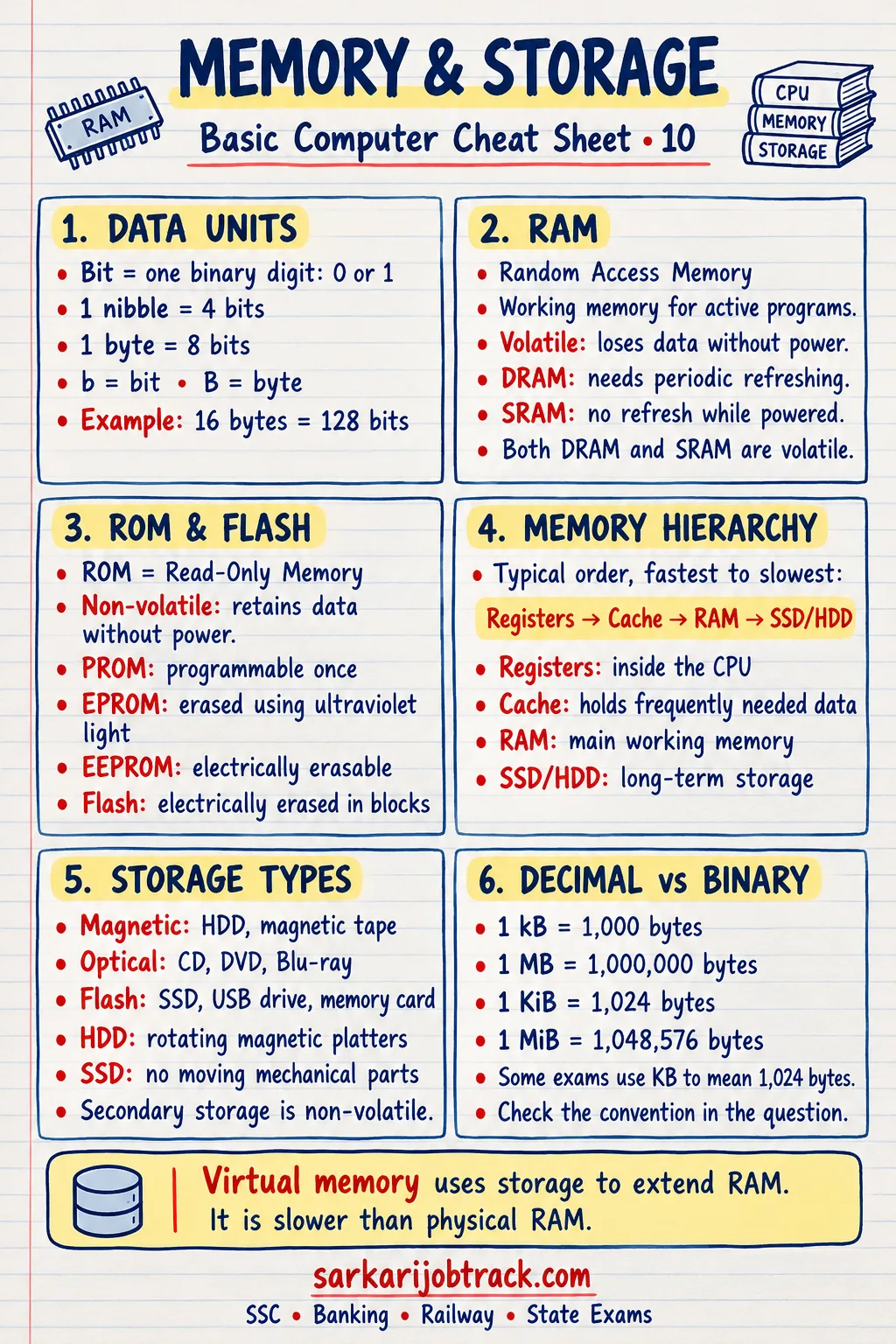
A quick revision cheat sheet on computer memory and storage for SSC, Banking, Railway and state exams. It explains primary versus secondary memory, RAM versus ROM and their types, cache and registers, volatile versus non-volatile memory, the units from bit to terabyte, and the capacities of CD, DVD and Blu-ray discs.
Memory and Storage Cheat Sheet
Quick Revision
Memory holds data and instructions for the computer. It is of two broad kinds: primary memory (fast, directly used by the CPU) and secondary memory (slower, used for long-term storage).
Ready to practise? Take the Memory and Storage quiz
1. Primary vs Secondary Memory
| Primary memory | Secondary memory | |
|---|---|---|
| Speed | Fast | Slower |
| Use | Directly used by the CPU | Long-term storage |
| Examples | RAM, ROM, cache | Hard disk, SSD, pen drive, CD |
| On power off | RAM contents are lost | Data is kept |
2. RAM vs ROM
| RAM | ROM | |
|---|---|---|
| Full form | Random Access Memory | Read Only Memory |
| Nature | Volatile (lost on power off) | Non-volatile (kept) |
| Use | Temporary working memory | Stores start-up instructions |
| Editable | Read and write | Mainly read only |
Types of RAM:
- SRAM (Static RAM) — faster, used in cache; no refreshing needed.
- DRAM (Dynamic RAM) — slower, cheaper, used as main memory; must be refreshed.
Types of ROM:
- PROM — Programmable ROM (written once).
- EPROM — Erasable PROM (erased by ultraviolet light).
- EEPROM — Electrically Erasable PROM.
3. The Memory Hierarchy (fastest to slowest)
Registers → Cache → RAM → Secondary storage (SSD, HDD)- Registers — tiny, fastest memory inside the CPU.
- Cache — very fast memory between the CPU and RAM; stores frequently used data.
- RAM — main working memory.
- Secondary storage — largest and cheapest, but slowest.
As you go down the list, speed falls but capacity and affordability rise.
4. Volatile vs Non-Volatile
- Volatile — loses its contents when power is off. Example: RAM.
- Non-volatile — keeps its contents without power. Examples: ROM, hard disk, SSD, pen drive.
5. Units of Memory
| Unit | Equals |
|---|---|
| 1 Byte | 8 bits |
| 1 Kilobyte (KB) | 1024 Bytes |
| 1 Megabyte (MB) | 1024 KB |
| 1 Gigabyte (GB) | 1024 MB |
| 1 Terabyte (TB) | 1024 GB |
6. Common Storage Devices and Capacities
| Device | Typical capacity |
|---|---|
| CD (Compact Disc) | about 700 MB |
| DVD | 4.7 GB (single layer) |
| Blu-ray Disc | 25 GB (single layer) |
| Pen drive / USB | a few GB to 1 TB |
| Hard Disk (HDD) | hundreds of GB to several TB |
| Solid State Drive (SSD) | hundreds of GB to several TB; faster than HDD |
CDs, DVDs and Blu-ray are optical storage, read by a laser.
7. Exam Quick Tips
- RAM is volatile, ROM is non-volatile — the single most repeated question.
- Remember the hierarchy: Registers → Cache → RAM → Secondary storage.
- Capacities to memorise: CD ≈ 700 MB, DVD = 4.7 GB, Blu-ray = 25 GB.
- SSD is faster than HDD because it has no moving parts.
Keep revising with the rest of the Basic Computer section:
How this was made: Drafted with AI assistance; spot-checked by the editor on 31 October 2026.