
Computer Fundamentals Cheat Sheet
31 Oct 2026
Quick answer
A quick revision cheat sheet on computer fundamentals for SSC, Banking, Railway and state exams. It covers the input-process-output cycle, data versus information, hardware versus software, the parts of a computer, the five generations, types of computers, and the units of memory, with the full forms and shortcuts most often asked.
Computer Fundamentals Cheat Sheet
Quick Revision
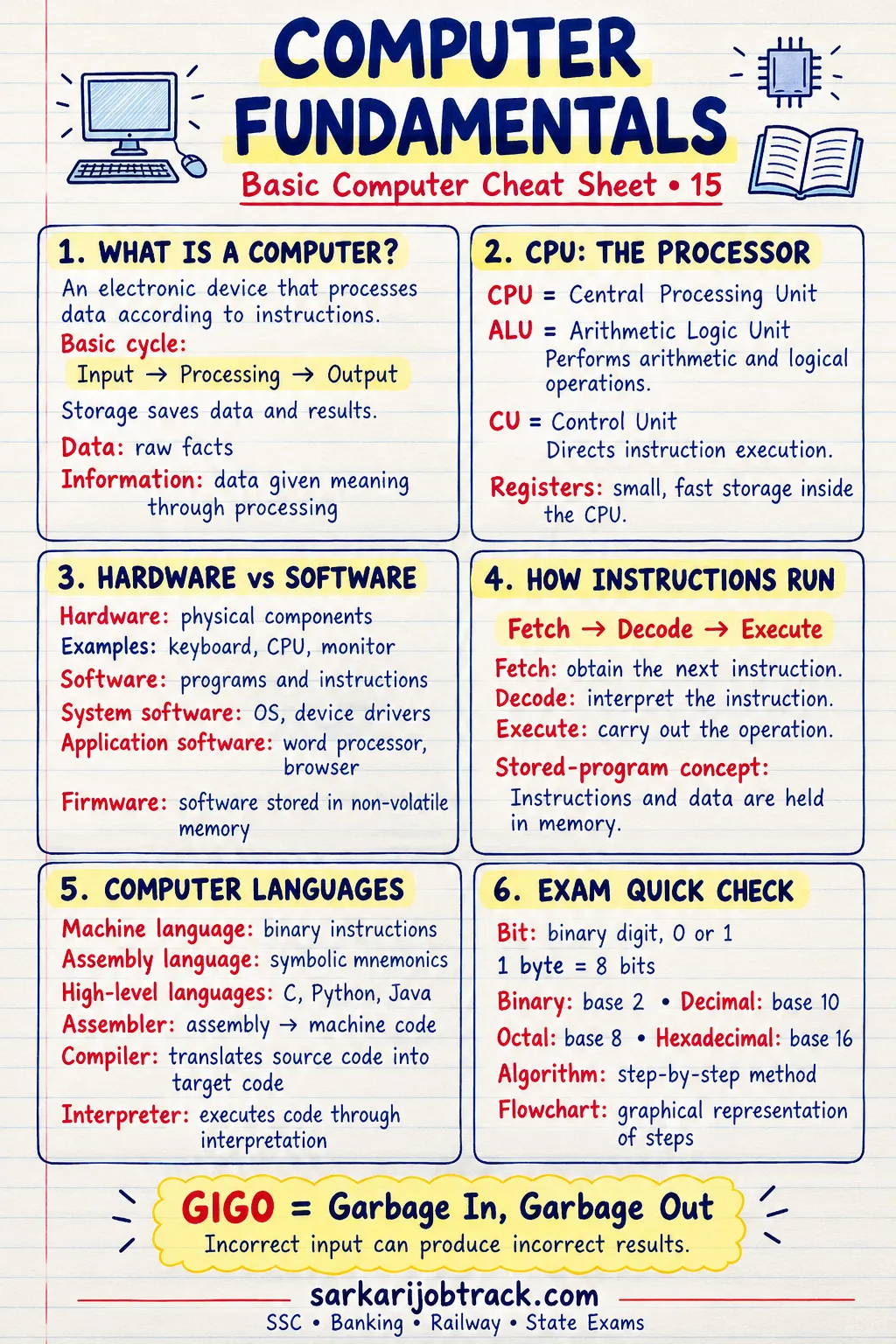
A computer is an electronic device that takes in data, processes it under the control of a set of instructions (a program), and produces meaningful information as output.
Ready to practise? Take the Computer Fundamentals quiz
1. The Input–Process–Output (IPO) Cycle
Every computer works in the same four steps:
| Stage | What happens | Example device |
|---|---|---|
| Input | Data and instructions are entered | Keyboard, mouse |
| Process | The CPU works on the data | Processor (CPU) |
| Storage | Data is held for later use | RAM, hard disk |
| Output | Results are shown to the user | Monitor, printer |
2. Data vs Information
- Data is raw, unprocessed facts and figures — for example, the marks 45, 60, 72.
- Information is processed, meaningful data — for example, "the average mark is 59".
Processing turns data into information.
3. Hardware vs Software
| Hardware | Software | |
|---|---|---|
| Meaning | The physical parts you can touch | The set of instructions (programs) |
| Examples | CPU, monitor, keyboard, RAM | Windows, MS Word, a web browser |
Software is of two main kinds:
- System software — runs and manages the computer (operating systems, utilities).
- Application software — does a specific task for the user (MS Word, a calculator, a game).
4. Main Parts of a Computer
The CPU (Central Processing Unit) is the "brain" of the computer. It contains three parts:
| Part of the CPU | Role |
|---|---|
| ALU (Arithmetic Logic Unit) | Does calculations and comparisons |
| CU (Control Unit) | Directs and coordinates all operations |
| Registers | Tiny, very fast storage inside the CPU |
The other main parts of a computer are:
- Memory — holds data and instructions (RAM, ROM).
- Input devices — send data in (keyboard, mouse).
- Output devices — show results (monitor, printer).
The CPU is also called the microprocessor in personal computers.
5. Generations of Computers
| Generation | Period (approx.) | Main technology | Example |
|---|---|---|---|
| First | 1940–1956 | Vacuum tubes | ENIAC, UNIVAC |
| Second | 1956–1963 | Transistors | IBM 1401 |
| Third | 1964–1971 | Integrated Circuits (ICs) | IBM 360 |
| Fourth | 1971–present | Microprocessors (VLSI) | Intel 4004, PCs |
| Fifth | present & beyond | Artificial Intelligence, ULSI | AI-based systems |
The move across generations means smaller size, lower cost, less power use and greater speed.
6. Types of Computers
By the data they handle:
- Analog — works with continuous values (e.g. a speedometer).
- Digital — works with discrete values (0s and 1s); most computers today.
- Hybrid — combines both (used in hospitals, e.g. ECG machines).
By size and power (small to large):
Microcomputer → Minicomputer → Mainframe → Supercomputer.
A supercomputer is the fastest and most powerful; India's examples include PARAM and Pratyush.
7. Units of Memory
Memory is measured in bits and bytes. A bit (binary digit) is a single 0 or 1.
| Unit | Equals |
|---|---|
| 1 Nibble | 4 bits |
| 1 Byte | 8 bits |
| 1 Kilobyte (KB) | 1024 Bytes |
| 1 Megabyte (MB) | 1024 KB |
| 1 Gigabyte (GB) | 1024 MB |
| 1 Terabyte (TB) | 1024 GB |
| 1 Petabyte (PB) | 1024 TB |
Order (smallest to largest): Bit → Nibble → Byte → KB → MB → GB → TB → PB.
8. Common Full Forms
| Term | Full form |
|---|---|
| CPU | Central Processing Unit |
| ALU | Arithmetic Logic Unit |
| CU | Control Unit |
| RAM | Random Access Memory |
| ROM | Read Only Memory |
| IC | Integrated Circuit |
| VLSI | Very Large Scale Integration |
9. Exam Quick Tips
- Remember the IPO cycle: Input → Process → Store → Output.
- 1 Byte = 8 bits and each higher memory unit is 1024 times the one below it.
- Match each generation to its technology — this is the most repeated question.
- The CPU holds the ALU, the CU and the registers; do not confuse the three.
Keep revising with the rest of the Basic Computer section:
How this was made: Drafted with AI assistance; spot-checked by the editor on 31 October 2026.