
Internet and Email: Read a Web Address, Follow DNS and Pick the Right Mail Protocol
Learn how the Internet differs from the World Wide Web, what web pages, websites, home pages, hyperlinks and HTML are, how to read a URL and its domain, what DNS does, how browsers, search engines, HTTP and HTTPS differ, how email addresses, To, CC and BCC work, and which jobs SMTP, POP3, IMAP and FTP do.
By the end of this lesson you will be able to tell the Internet from the Web, take a web address apart, say what DNS does with it, tell a browser from a search engine, address an email, and name the protocol behind each job. The core idea: the Internet is the network, a network of networks joining computers across the world; the Web and email are services that travel over it, each with its own set of rules, its protocol.
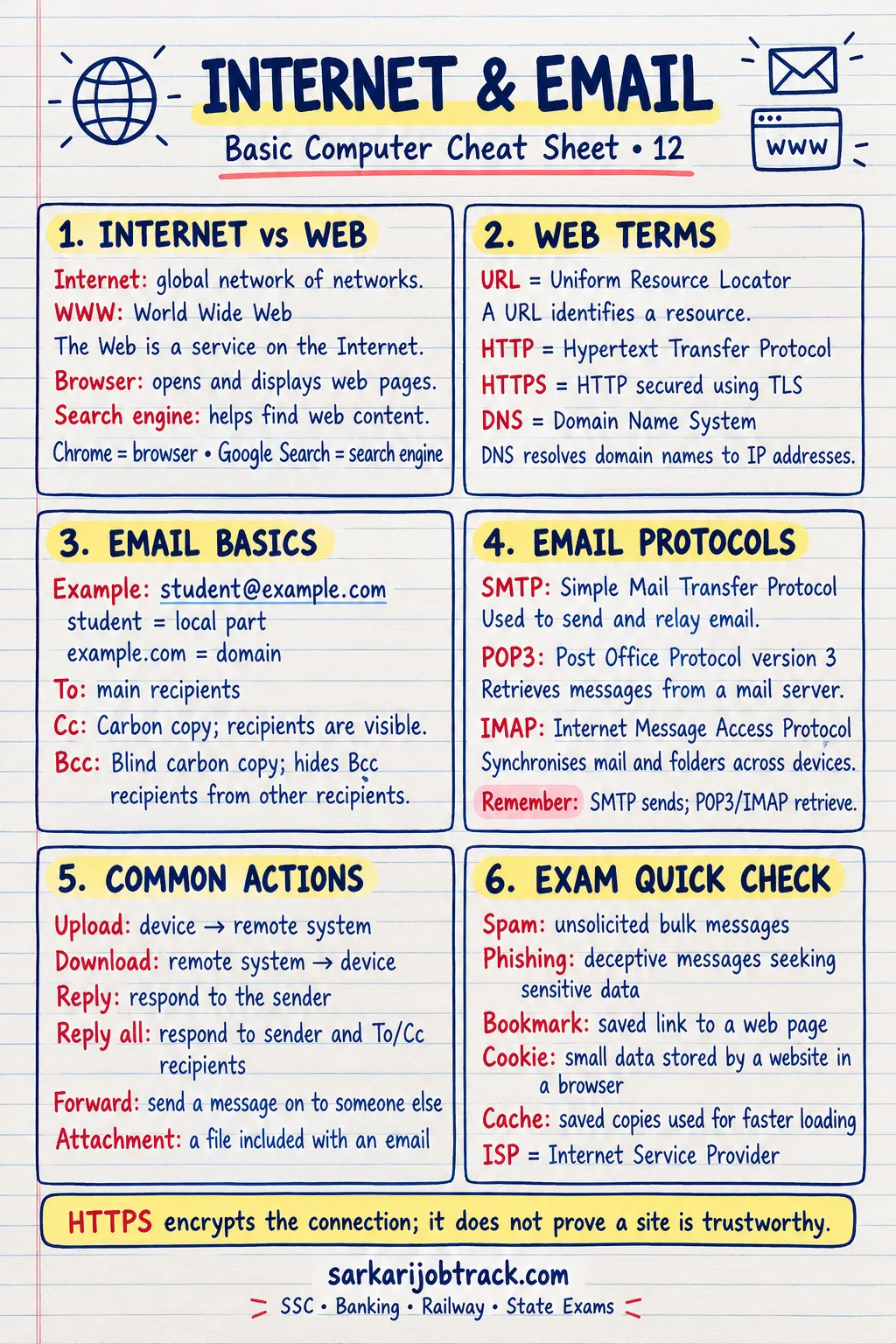
Short on time? Revise with the Internet and Email cheat sheet
Already confident? Skip to practice: Internet and Email quiz
Before this: the Networking lesson covers networks, LAN and WAN, routers and modems, and the IP and MAC addresses that identify each device. It ends where this lesson starts: the Internet is the largest WAN.
The Internet and the World Wide Web
NIOS calls the Internet a network of networks, "made up of thousands of smaller networks that can exchange information with each other", and no single person or organisation runs it. It grew out of ARPANET, set up in 1969 by the Advanced Research Projects Agency (ARPA) of the US Department of Defence (NCERT, IGNOU); ARPANET stands for Advanced Research Projects Agency Network (NIOS).
The World Wide Web (WWW) is, in NCERT's words, "trillions of interlinked web pages and web resources", accessed through the Internet. NCERT warns that people confuse the two: the Internet is the global network of computers, which may or may not have any page to share; the Web is the linked pages on those computers. IGNOU: "The Web cannot exist without the Internet." Email and file transfer are other services on the Internet.
Who invented the Web. CERN states that Tim Berners-Lee, a British scientist, "invented the World Wide Web (WWW) in 1989, while working at CERN": his first proposal is dated March 1989. By the end of 1990 the first web server and browser were running at CERN. NCERT dates the invention to 1990, when Berners-Lee defined HTML, URI and HTTP. For the exam: if a question asks when the Web was invented or proposed, answer 1989 (CERN's own date); if it asks when the first web server and browser were running, answer 1990. Berners-Lee also led the development of HTTP at CERN (NCERT).
Intranet, extranet, e-commerce. An intranet is a private network inside one organisation that uses Internet technology and protocols; only the organisation's people can reach it. An extranet gives limited, controlled access to chosen outsiders, such as clients, suppliers or partners, who log in with a username and password. E-commerce is the buying and selling of products, services and information over computer networks, including the Internet, as in online shopping and home banking (all IGNOU).
Web pages, websites and HTML
| Term | Meaning (NIOS unless stated) |
|---|---|
| Web page | a document that can be viewed in a web browser |
| Website | a collection of web pages linked to one another by hyperlinks |
| Home page | the first page of a website |
| Hyperlink | text or an image that links to another document; text with such links is hypertext (IGNOU, NCERT) |
| Web server | the server that responds to the requests web browsers make |
| HTML | HyperText Markup Language, used to design web pages |
"Home page" has a second meaning: the page a browser is set to open with, which is why exam questions call "the page that opens when the browser starts" the home page. Today's browsers keep the start-up page and the Home button as separate settings. In Microsoft's guide to changing the home page, Edge's choices on startup are the new tab page, the previous session's tabs or custom sites; Chrome's home page belongs to its "Show home button" setting; and Safari can "open new windows with your homepage".
HTML lays out a page's headings, text, pictures, tables and hyperlinks using commands called tags, such as the HTML, HEAD and BODY tags. NIOS stresses that it is a markup language, "neither a word processing application nor ... a programming language".
Reading a URL
Every page or file on the Web has a unique address, its URL: Uniform Resource Locator, also called a web address; NCERT also calls it a URI, though strictly a URL is one kind of URI (RFC 3986). NIOS gives its form as type://address/path:
Part of http://www.ncert.nic.in/textbook/textbook.htm | Name | What it says |
|---|---|---|
http | protocol (scheme) | which rules to use to fetch the item |
:// | separator | a colon and two slashes after the protocol |
www.ncert.nic.in | domain name | which server holds it |
/textbook/textbook.htm | path | where the file sits on that server |
NCERT's point: a URL is more than the domain name, which is only the server part.
Domain names and top-level domains
The last part of a domain name is its top-level domain (TLD), showing a type of organisation or a country (IGNOU). NIOS lists:
| TLD | Meant for |
|---|---|
| .com | commercial firms and companies |
| .edu | educational organisations |
| .gov | government organisations |
| .mil | military bodies |
| .net | network organisations |
| .org | non-profit organisations |
NIOS heads this column "Domain Name" and calls .com "a commercial domain", so an exam question may call .com or .edu a "domain"; it means the top-level domain.
Two-letter TLDs are country codes; .in is India's. Note that .edu and .gov are run from the United States: IANA, which keeps the list of TLDs, names EDUCAUSE as the .edu manager and the US Cybersecurity and Infrastructure Security Agency as the .gov manager. Indian bodies use zones that the .IN Registry reserves for qualified Indian organisations: gov.in (Indian government), ac.in (academic), edu.in (Indian colleges and universities), res.in (research institutes) and mil.in (military). Indian government sites also use nic.in, which is not on that list: NCERT's own address, www.ncert.nic.in, is one.
Example 1: Which part is the path?
Question: In the address https://www.example.com/exams/notice.html, which part is the path? (a) https (b) www.example.com (c) .com (d) /exams/notice.html
https, before://, is the protocol.www.example.comis the domain name, and.comis its top-level domain.- What follows the domain name is the file's location on the server: the path.
Answer: (d) /exams/notice.html.
Example 2: Reading the domain
Question: A website's address ends in .gov.in. Who runs it? (a) A college in India (b) A federal agency of the United States (c) A government body in India (d) A private company in India
.inis India's country code, so (b) is out.- The .IN Registry reserves gov.in for the Indian government; a college would use ac.in or edu.in.
Answer: (c) A government body in India.
DNS: from a name to a number
Computers on the Internet find one another by IP address, a number (its format is in the Networking lesson). Numbers are hard to remember, so each server hosting a website also gets a domain name. NCERT compares this to a phonebook: you remember the name; the book holds the number.
The Domain Name System (DNS) translates. When you enter a URL, a DNS server is asked for the IP address matching the domain name; with that address, the page is fetched. Turning a name into its IP address is domain name resolution, and DNS servers form a hierarchy with root servers at the top (NCERT).
Do not confuse DNS with DHCP (Dynamic Host Configuration Protocol), which passes configuration to devices on a network, including automatic allocation of network addresses (RFC 2131). DHCP gives a device its IP address; DNS looks up a server's IP address from its name. Routing packets is the router's job, and encrypting web traffic is HTTPS's.
Browsers, search engines, HTTP and HTTPS
A web browser is a software application for viewing web pages and moving from page to page across the Web. NIOS names Internet Explorer, Firefox, Google Chrome, Netscape Navigator and Safari; Microsoft Edge is another.
A search engine is "a program that searches for information on the Internet" (IGNOU): you type a query, and it returns the search results. IGNOU names yahoo.com and google.com; Microsoft Edge uses Bing as its default search engine, searched from the browser's address bar. So you use a search engine inside a browser. IGNOU names the trap: "Google is a search engine whereas Google Chrome is a web browser."
HTTP (HyperText Transfer Protocol) is the set of rules used to fetch linked web pages: the browser sends a request, and the web server sends the page back (NCERT). HTTPS (Hypertext Transfer Protocol Secure) encrypts the data, such as passwords and card numbers. In Microsoft Edge, an HTTPS site shows a padlock before the URL; an HTTP site may show "Not secure" or no padlock. The padlock means the connection is secure, not that the site is honest: Microsoft notes that sites with valid certificates may have a poor reputation, so check the address too. (Chrome is different: in May 2023 the Chromium Blog announced that Chrome 117, due in September 2023, would replace the padlock with a "tune" icon for site settings, and that Chrome would go on marking plain HTTP as insecure. Exam questions still ask about the padlock.)
A cookie is a message a web server gives the browser. The browser stores it in a text file and sends it back with each request to that server, so the site can track the user's activity and show customised pages (NIOS). Cookies are neither plug-ins nor malicious programs.
Example 3: Only browsers
Question: Which list contains only web browsers? (a) Chrome, Google, Safari (b) Firefox, Safari, Microsoft Edge (c) Google, Yahoo, Firefox (d) Yahoo, Google, Chrome
- Google and Yahoo are search engines, so (a), (c) and (d) are out.
- Firefox, Safari and Microsoft Edge all display web pages.
Answer: (b) Firefox, Safari, Microsoft Edge.
The principle: a browser is the program on your device; a search engine is a service you use inside it.
Getting online: ISPs and connections
An Internet Service Provider (ISP) is any organisation that provides services for accessing the Internet (NCERT). NCERT traces the chain: computer to modem (by cable or Wi-Fi), modem to a local ISP, then regional and national networks, which form the Internet backbone. IGNOU lists the types of connection: dial-up over a telephone line, DSL (Digital Subscriber Line), cable Internet, ISDN, wireless, leased lines and mobile phone. With 3G, mobile networks provided Internet access over the same radio towers as voice calls, and satellites can deliver broadband too (NCERT).
Files: FTP, upload, download and the cloud
FTP (File Transfer Protocol) transfers files from one machine to another, on a client–server model like HTTP (NCERT); it is mostly used to download a file from a server or upload one to it (NIOS). IGNOU: download is "to retrieve a file from another computer"; upload is "to send a file to another computer". In cloud computing, "the word 'cloud' signifies Internet": cloud services include software and storage space over the net, needing only a browser and an Internet connection (NIOS).
The address
NIOS's example is Student_nios@gmail.com: the username, the @ sign, then gmail.com, the email service provider with the commercial TLD .com. The mail standard, RFC 5321, gives the pattern as local-part@domain: who, then where. The part right after @ is the domain name.
The message
| Field | Use |
|---|---|
| To | the main recipients; separate addresses with commas |
| CC (carbon copy) | others who get a copy; all recipients can see the CC addresses |
| BCC (blind carbon copy) | others who get a copy, with their addresses hidden from the other recipients |
| Subject | the title the recipient sees before opening |
| Attachment | a file sent with the mail (the paperclip icon) |
The Inbox lists received mail, newest on top (NIOS). Only the sender can see who was on the BCC line (Microsoft).
Spam is junk email (NCERT), "mass unsolicited electronic mail" in the words of RFC 2635. Mail programs can move it to a junk folder: Microsoft's Outlook filter "moves suspected spam to the Junk Email folder" and advises checking there for genuine mail caught by mistake. Fake mail that tries to steal passwords is phishing, taught in Computer Security.
Example 4: Hiding a list
Question: A teacher emails one notice to 40 parents. No parent should see any other parent's address. Where should she put the addresses? (a) To (b) CC (c) BCC (d) Subject
- To and CC addresses are visible to every recipient; the Subject holds a title.
- BCC sends each parent a copy while hiding the addresses.
Answer: (c) BCC.
Sending and receiving: SMTP, POP3 and IMAP
Your computer sends a mail to an SMTP server, which forwards it to the recipient's mail server, where it waits until the recipient collects it (IGNOU).
| Protocol | Full form | Job |
|---|---|---|
| SMTP | Simple Mail Transfer Protocol | sends: from your mail program to the server, and server to server |
| POP3 | Post Office Protocol, Version 3 | receives: downloads mail to one device, normally deleting it from the server |
| IMAP | Internet Message Access Protocol | receives: you read and organise mail on the server, so every device sees the same mailbox |
RFC 1939, which defines POP3: "normally, mail is downloaded and then deleted". RFC 9051, which defines IMAP: it lets a client "access and manipulate electronic mail messages on a server", and it leaves sending to a submission protocol, which is SMTP. Microsoft recommends IMAP for checking mail from several devices; with POP, downloaded mail stays on the one computer that downloaded it.
Example 5: The false statement
Question: Which statement about email protocols is NOT true? (a) SMTP carries outgoing mail to the mail server. (b) POP3 normally downloads mail and then deletes it from the server. (c) IMAP keeps mail on the server, so a phone and a laptop see the same mailbox. (d) IMAP is the protocol that sends outgoing mail.
- (a), (b) and (c) match the table.
- IMAP and POP3 both receive; sending is SMTP's job.
Answer: (d).
The principle: S for SMTP, S for Send. POP3 takes the mail away; IMAP leaves it on the server.
Example 6: Matching jobs to systems
Question: Match 1. DNS, 2. DHCP, 3. HTTP, 4. FTP with P. transfers files between two computers; Q. finds the IP address for a domain name; R. gives a device an IP address automatically; S. carries web pages between browser and web server. (a) 1-Q, 2-R, 3-S, 4-P (b) 1-R, 2-Q, 3-S, 4-P (c) 1-Q, 2-S, 3-R, 4-P (d) 1-S, 2-R, 3-Q, 4-P
- DNS turns names into numbers: 1-Q. Only (a) and (c) remain.
- DHCP allocates addresses: 2-R. Only (a) remains.
- Check: HTTP carries pages (3-S), FTP transfers files (4-P).
Answer: (a).
Example 7: Who can get in?
Question: A company's staff use its private network, and its suppliers log in with a username and password to check their orders on part of it. What is the part opened to suppliers? (a) The Internet (b) An intranet (c) An extranet (d) ARPANET
- The network is private, so not the Internet. A network for the company's own people only is an intranet.
- Controlled access for chosen outsiders such as suppliers makes it an extranet.
Answer: (c) An extranet.
Look-alikes: telling them apart
| Pair | The difference |
|---|---|
| Internet vs Web | the Internet is the network; the Web is linked pages carried over it |
| Browser vs search engine | a browser shows pages; a search engine finds them, inside a browser |
| URL vs domain name | the URL is the full address; the domain name is only the server's name |
| DNS vs DHCP | DNS finds an IP address from a name; DHCP gives a device its address |
| HTTP vs HTTPS vs FTP | HTTP fetches pages; HTTPS does it encrypted; FTP transfers files |
| SMTP vs POP3 vs IMAP | SMTP sends; POP3 downloads and removes; IMAP reads on the server |
| CC vs BCC | CC addresses are visible to all; BCC addresses are hidden |
| Intranet vs extranet | staff only vs staff plus chosen outsiders |
In the exam
Computer Knowledge is a named module in SSC CGL Tier-II and SSC CHSL, and part of General Awareness in RRB NTPC. Internet and email questions come in a few shapes:
- "What does it stand for?" HTTP, URL, FTP, SMTP, ISP, DNS, HTML. How to spot it: write out each word. HTTP has Transfer, not Transmission; URL has Locator; HTML has Markup.
- "Which protocol or system does this job?" How to spot it: find the verb. Send mail SMTP; download and remove POP3; keep on the server for several devices IMAP; transfer files FTP; fetch web pages HTTP; name to IP address DNS; give a device an address DHCP.
- "Which one is a …?" How to spot it: sort every option first. Chrome, Firefox, Safari and Edge are browsers; Google, Yahoo and Bing are search engines; a TLD shows the kind of body or the country.
Common mistakes
- Treating the Web as the Internet. The Web is one service on the Internet; email is another.
- Calling Google a browser. Google is a search engine; Chrome is the browser.
- Giving DNS the job of DHCP. DNS looks addresses up; it does not hand them out.
- Using IMAP or POP3 to send. Both receive; only SMTP sends.
- Mixing up CC and BCC. Blind means hidden.
- Reading a padlock as proof that a site is genuine. It shows the connection is encrypted.
- Assuming .gov or .edu for Indian bodies. The .IN Registry reserves gov.in, ac.in and edu.in for them, and government sites also use nic.in, as NCERT's does.
At a glance
- Internet = network of networks, from ARPANET (1969). Web = linked pages over it; Tim Berners-Lee at CERN (proposed 1989; first server and browser 1990).
- Website = pages joined by hyperlinks; home page = its first page, or the page a browser opens with. HTML = markup language with tags.
- URL = protocol +
://+ domain name + path. TLDs: .com, .edu, .gov, .org, .net, .mil, .in; Indian zones gov.in, ac.in, edu.in. - DNS: name → IP address. DHCP: gives a device its address.
- Browser shows pages; search engine (Google, Yahoo, Bing) finds them. HTTP fetches pages; HTTPS encrypts (padlock). Cookie = a server's message stored by the browser.
- ISP gives access. Intranet = staff only; extranet = plus chosen outsiders. E-commerce = buying and selling online.
- FTP transfers files; upload sends, download fetches; cloud = storage and software over the Internet.
- Email: username@domain; CC visible, BCC hidden; spam = mass unsolicited mail. SMTP sends; POP3 downloads and deletes; IMAP keeps mail on the server.
Next
The last lesson in the Basic Computer series is Computer Security: phishing, malware, firewalls and encryption, and how to protect a computer and an account. Go on to the Computer Security lesson, revise with the Computer Security cheat sheet, or browse every topic under Basic Computer.
Ready to test this lesson? Take the Internet and Email quiz
How this was made: Drafted with AI assistance; every answer re-solved by a separate check that had not seen the key; every fact checked against the source it cites.