
Networking: Tell Network Types, Topologies and Devices Apart, and Read IP and MAC Addresses
Learn what a computer network is for, how PAN, LAN, MAN and WAN differ, the strengths and weaknesses of bus, star, ring, mesh, tree and hybrid topologies, which cable or wireless link suits which job, what each network device does, how client–server differs from peer-to-peer, how data rates are measured, and how IP and MAC addresses differ.
By the end of this lesson you will be able to name a network by its area, say which topology a description fits and what a failure does to it, choose a cable or wireless link, tell the network devices apart, turn a data rate into bytes, and tell an IP address from a MAC address. The core idea: a computer network is two or more computers or devices connected so that they can share data and resources. The rest is how big the network is, what shape it has, what carries its signals, and which devices pass them along.
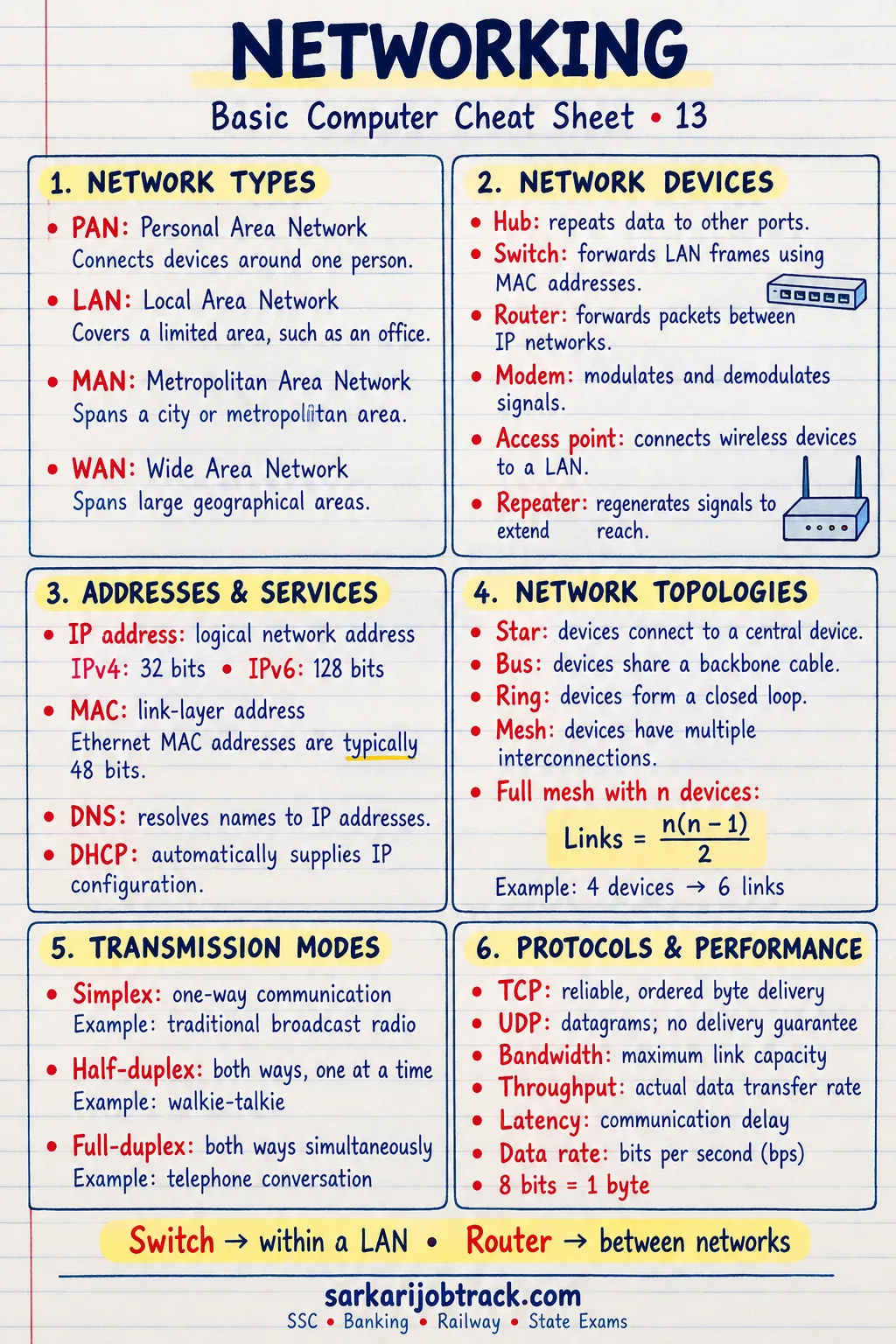
Short on time? Revise with the Networking cheat sheet
Already confident? Skip to practice: Networking quiz
Before this: the Computer Hardware lesson shows the network interface card in its expansion slot and the eight-pin RJ-45 port a network cable plugs into; this lesson follows that cable out of the computer. You also need "1 byte = 8 bits", from the Computer Fundamentals lesson.
What a network is and why it is used
NCERT defines a computer network as "an interconnection among two or more computers or computing devices". Each device on it, whether computer, printer, server, switch or router, is a node. Networks let many computers share resources, such as one printer or one networked store of files, and share data and communicate, through email, websites and video calls. The data is divided into small chunks called packets, which travel over cables or through the air.
Networks by area: PAN, LAN, MAN and WAN
| Network | Full form | Area it covers (NCERT) | Example |
|---|---|---|---|
| PAN | Personal Area Network | a few personal devices, within about 10 m | a phone joined to a laptop by USB (wired); two phones over Bluetooth (wireless PAN, WPAN) |
| LAN | Local Area Network | a room, floor, building or campus; up to about 1 km | a school computer lab; an office |
| MAN | Metropolitan Area Network | a city or town; up to about 30–40 km | a cable TV or cable broadband network across a city |
| WAN | Wide Area Network | a country, or several countries and continents | a firm linking branches abroad; the Internet is the largest WAN |
In order of size: PAN < LAN < MAN < WAN. NCERT gives LAN speeds from 10 Mbps (Ethernet) to 1000 Mbps (Gigabit Ethernet) and calls a MAN "considerably" slower. Ethernet is the set of rules for connecting devices by cable in a LAN; a LAN that is entirely wireless is a WLAN.
The word "campus". NCERT puts a school, college or university campus in a LAN, but NIOS and IGNOU say a MAN can cover a campus too. So look for the decisive clue word: "building" or "office" means LAN; "city" or "town" means MAN.
Topologies: the shape of the network
The topology of a network is the arrangement of its computers and other devices.
| Topology | How it is connected | Strength | Weakness |
|---|---|---|---|
| Bus | every device taps one shared backbone cable, with a terminator at each end | cheapest; least cable; one failed computer does not stop the rest | a break in the main cable brings down the whole network; one sender at a time, so it slows as devices are added |
| Star | every device has its own cable to a central hub or switch | one failed cable or computer affects only that device; easy to add and troubleshoot | if the central device fails, the whole network stops; more cable than a bus |
| Ring | each device linked to exactly two neighbours in a closed loop; data goes one way round | every device gets an equal turn to send | one malfunctioning node can cause problems for the entire network; hard to troubleshoot |
| Mesh | every device linked to every other | many paths, so it carries heavy traffic and survives a failed link; more secure | the most cabling, highest cost, most complex wiring |
| Tree | a hierarchy: star networks hanging off a backbone | whole star networks can be added or removed | if the backbone breaks, the segment below it goes down |
| Hybrid | two or more topologies combined, such as stars joined on a bus | easy to expand | if a hub fails, every computer on that hub is cut off |
NCERT treats tree and hybrid under one heading. To survive a ring break, the FDDI design (IGNOU) uses two rings running in opposite directions, which wrap round a broken cable.
A full mesh of n devices needs n(n − 1)/2 cables: each device links to the other n − 1, and each cable joins two devices, so it would otherwise be counted twice.
Example 1: Counting mesh cables
Question: An office wants a full mesh of 6 computers, every pair with its own cable. How many cables are needed? (a) 6 (b) 12 (c) 15 (d) 30
- Each computer needs a cable to the other 5: 6 × 5 = 30 cable-ends.
- Each cable has two ends: 30 ÷ 2 = 15, which is n(n − 1)/2 with n = 6.
- 30 counts every cable twice; 6 is the number of computers.
Answer: (c) 15.
Example 2: What a star does not do
Question: Which statement about a star topology is NOT true? (a) Each device has its own cable to a central hub or switch. (b) If one device's cable fails, the others keep working. (c) If the central device fails, the whole network stops. (d) It needs less cable than a bus, because no backbone cable is laid.
- (a) is the definition; (b) and (c) are the star's main strength and main weakness.
- (d) is backwards: every cable in a star runs all the way to the centre, so a star needs more cable. The bus needs the least.
Answer: (d).
Transmission media
Guided (wired) media carry the signal along a cable; unguided (wireless) media carry it through the air as electromagnetic waves, using an antenna.
| Medium | What it is | Strength | Weakness or use |
|---|---|---|---|
| Twisted pair | two insulated copper wires twisted together; unshielded (UTP) or shielded (STP) | inexpensive; the twist cuts interference from nearby pairs | less bandwidth than coaxial; telephone lines and LANs |
| Coaxial cable | copper core, insulation, braided outer conductor, plastic cover | better shielded and more bandwidth than twisted pair | not easy to install; the cable that brings cable TV |
| Optical fibre | light travelling through a thin glass strand inside a less dense glass layer (cladding) | highest bandwidth, so the highest data rate; long distances; immune to electromagnetic noise; light | expensive; NCERT notes a fibre carries light one way, so full-duplex links usually use a pair of fibres; used in backbones |
Twisted pair and coaxial carry electrical signals; fibre carries light. Among wireless media, radio waves spread in all directions, and some frequencies pass through walls; microwaves travel in one direction and need a clear line of sight, as in satellite links; infrared is short-range, cannot pass through walls, and is used by TV remotes.
Example 3: Choosing the medium
Question: A college must link two buildings 2 km apart. The route passes heavy electrical machinery, and the link must carry the highest possible data rate. Which medium? (a) Optical fibre (b) Unshielded twisted pair (c) Coaxial cable (d) Infrared
- Three conditions: long distance, electrical noise, highest data rate.
- Infrared is short-range and stopped by walls. Twisted pair and coaxial carry electrical signals; twisting and shielding reduce interference, but neither matches fibre's bandwidth.
- Fibre carries light, which electromagnetic noise cannot affect; it travels long distances and has the highest bandwidth.
Answer: (a) Optical fibre.
Network devices
| Device | What it does |
|---|---|
| NIC (Network Interface Card, or Ethernet card) | connects a computer to a wired network; each NIC has its own MAC address |
| Modem (MOdulator–DEModulator) | converts digital data into analog signals for a line such as a telephone line, and back again at the other end |
| Repeater | regenerates a weakened signal so it can travel further (NCERT: signals on a cable weaken beyond about 100 m) |
| Hub | sends whatever arrives out of every port; if two devices send at once, their data collide |
| Switch | reads each frame's destination address and sends it only to that device's port |
| Bridge | joins two network segments, passing a packet across only if its destination is on the other side, so there are fewer collisions |
| Router | joins different networks, such as a LAN and the Internet, and chooses the path between them |
| Gateway | the entry and exit point between a network and outside networks; NIOS: joins networks that use different protocols ("protocol converter") |
| Access point | connects to a wired router, switch or hub and creates a wireless LAN for Wi-Fi devices |
A home Wi-Fi router often does the work of router and modem or switch in one box, and NCERT notes that a router is generally configured to act as the gateway.
Hub vs switch vs router
| Hub | Switch | Router | |
|---|---|---|---|
| Joins | devices in one network | devices in one network | separate networks |
| Sends data | to every port | to the addressed device's port only | towards the destination network, by the best path |
| Address it reads | none | MAC (hardware) address | network (IP) address |
| OSI layer (IGNOU) | 1, Physical | 2, Data Link | 3, Network |
A switch learns which device sits on which port, so on a busy network it is much faster than a hub.
Example 4: Every port, every time
Question: In a school lab, 20 PCs are cabled to one central box. Whatever one PC sends, the box passes out of every port, and when two PCs send at once their data collide. What is the box? (a) Switch (b) Hub (c) Router (d) Access point
- A switch would send to one port only.
- A router joins separate networks, and this is one lab. An access point serves wireless devices, and these PCs are cabled.
- Everything to every port, with collisions: a hub.
Answer: (b) Hub.
Example 5: Matching devices to jobs
Question: Match the devices 1. Modem, 2. Repeater, 3. Gateway, 4. Access point to the jobs P. regenerates a weak signal; Q. converts digital data to analog and back; R. joins networks that use different protocols; S. lets Wi-Fi devices join a wired network. (a) 1-P, 2-Q, 3-S, 4-R (b) 1-Q, 2-P, 3-R, 4-S (c) 1-Q, 2-R, 3-P, 4-S (d) 1-S, 2-P, 3-R, 4-Q
- Modem = modulator–demodulator, so 1-Q. Only (b) and (c) remain.
- A repeater regenerates, so 2-P. Only (b) remains.
- Check the rest of (b): gateway 3-R, access point 4-S.
Answer: (b).
The principle: fix the pair you are surest of first, then strike out every option that disagrees.
Wi-Fi, Ethernet and Bluetooth
The IEEE numbers its LAN standards in the 802 series: 802.3 is Ethernet (wired LAN), 802.11 is wireless LAN, popularly Wi-Fi, and 802.15 covers wireless personal area networks. Its 802.15.1 standard was derived from the Bluetooth v1.1 specification.
Bluetooth is a short-range wireless technology for linking phones, headphones, keyboards and computers, in the 2.4 GHz band; NCERT gives its range as about 10 m. Devices in range form a small PAN called a piconet, where one master talks to up to 7 active devices. NIOS gives Wi-Fi a range of about 100 m and calls it much faster than Bluetooth.
Client–server and peer-to-peer
In a client–server network, dedicated servers provide services such as files or mail, and clients are the computers that request and use them; access and security are managed at the server. In a peer-to-peer (P2P) network there is no dedicated server: every computer is equal and acts as both client and server, sharing its own files and printers. IGNOU notes that many networks combine the two. So a small shop whose three PCs share folders and a printer directly, with no server, is a peer-to-peer network.
Bandwidth and data rate
Data transfer rate (bit rate) is the number of bits sent per second, in bits per second (bps), then kbps, Mbps, Gbps and Tbps, each step about a thousand times larger. In SI units 1 kbit = 1000 bits (NIST), and NCERT and IGNOU both write Gigabit Ethernet's 1 Gbps as 1000 Mbps; NCERT's Data Communication chapter instead tabulates steps of 1024. Use whichever value the options offer.
Bandwidth has two senses. NCERT and NIOS define it as the range of frequencies a channel or signal carries, measured in hertz (Hz); NCERT adds "higher the bandwidth, higher the data transfer rate". IGNOU defines it as the amount of data a connection can carry, and in everyday use a connection's bandwidth is quoted in bits per second, just like its data rate (NIOS grades bandwidth classes in Kbps and Mbps). If a question offers only one of Hz and bps, that is the answer. If it asks for the range of frequencies, choose Hz; if it asks for the data transfer rate, choose bps.
Mbps vs MBps: small b is bits, capital B is bytes. Divide Mbps by 8 to get MBps.
Example 6: From megabits to megabytes
Question: A broadband plan is advertised as 100 Mbps. At most, about how many megabytes can it carry each second? (a) 12.5 MB (b) 100 MB (c) 800 MB (d) 1.25 MB
- The small b means megabits per second.
- 1 byte = 8 bits, so 100 ÷ 8 = 12.5 megabytes.
- (b) mistakes bits for bytes; (c) multiplies by 8 instead of dividing.
Answer: (a) 12.5 MB.
Addresses: MAC and IP
Every node needs a unique address so that the sender and receiver can be identified and data routed between them.
- MAC address (Media Access Control): the physical or hardware address of a network card, put on the NIC by its manufacturer. It is 48 bits, written as 12 hexadecimal digits; the first 6 identify the manufacturer. Software can override it; many phones and laptops use a random MAC address for each Wi-Fi network to protect privacy.
- IP address (Internet Protocol): the address assigned to each node on a network that uses the Internet Protocol; knowing a computer's IP address lets you communicate with it from anywhere in the world. Unlike the MAC address, it can change when the device moves to another network.
- IPv4: 32 bits, written as four numbers from 0 to 255 separated by dots, such as 192.168.0.178; just under 4.3 billion addresses. To get more, IPv6 uses 128 bits, written as eight groups of hexadecimal digits separated by colons.
The DNS (Domain Name System), which translates a domain name into its IP address, belongs to the Internet and Email topic: see the Internet and Email cheat sheet.
Example 7: Spot the IPv4 address
Question: Which of these could be a valid IPv4 address? (a) 192.168.1.300 (b) 2001:CDBA:0000:0000:0000:0000:3257:9652 (c) 10.0.0.25 (d) 00-1A-2B-3C-4D-5E
- IPv4 is four decimal numbers, each 0 to 255, separated by dots.
- (a) has 300, above 255. (b) is eight hexadecimal groups with colons: IPv6. (d) is 12 hexadecimal digits: the form of a MAC address.
- (c) passes every test.
Answer: (c) 10.0.0.25.
The OSI model
The OSI (Open System Interconnection) model, developed by the ISO, has seven layers, top to bottom: Application, Presentation, Session, Transport, Network, Data Link, Physical. Hubs and repeaters work at the Physical layer, bridges and switches at Data Link, and routers at Network.
Look-alikes: telling them apart
| Pair | The difference |
|---|---|
| Hub vs switch | a hub sends to every port; a switch only to the addressed port |
| Switch vs router | a switch joins devices within one network; a router joins separate networks |
| Router vs gateway | a router chooses paths between networks; a gateway is the way in and out of a network and can join networks with different protocols |
| Modem vs router | a modem converts digital to analog and back; a router forwards data between networks |
| MAC vs IP address | MAC: hardware, set by the manufacturer, 48 bits; IP: assigned on the network, can change between networks |
In the exam
Computer Knowledge is a named module in SSC CGL Tier-II and SSC CHSL, and part of General Awareness in RRB NTPC. Networking questions come in a few shapes:
- "Which device …?" How to spot it: find the verb. Regenerates is a repeater, every port a hub, only the addressed port a switch, between networks a router, different protocols a gateway, digital to analog a modem.
- "Which topology or network type …?" How to spot it: central device means star; every device to every other or most cable means mesh; closed loop means ring; one shared cable means bus; hierarchy means tree. For area: building LAN, city MAN, countries WAN, personal devices PAN.
- "How many bits / what does it stand for / which number?" How to spot it: IPv4 32, IPv6 128, MAC 48; OSI 7 layers; 802.11 Wi-Fi, 802.3 Ethernet, 802.15 WPAN.
Common mistakes
- Calling a switch a hub. The hub repeats to every port; the switch sends to one.
- Saying a modem joins networks. It converts signals; the router joins networks.
- Treating Mbps as MBps. 100 Mbps is 12.5 MBps.
- Thinking the IP address stays with the device. The MAC address belongs to the card; the IP address can change when the device joins another network.
- Thinking a star survives any failure. It survives a failed cable, not a failed centre.
At a glance
- Network = devices sharing data and resources; data travels in packets.
- PAN (~10 m) < LAN (building, campus) < MAN (city) < WAN (countries); the Internet is the largest WAN.
- Bus one cable, cheapest, cable break stops all; star central device, single point of failure; ring closed loop; mesh every-to-every, n(n − 1)/2 cables, costliest; tree hierarchy; hybrid a mix.
- Twisted pair cheap; coaxial shielded, cable TV; fibre light, highest data rate, immune to noise; microwave line of sight; infrared short, no walls.
- Modem digital ↔ analog; repeater regenerates; hub all ports; switch one port (MAC); bridge joins segments; router between networks (IP); gateway different protocols; access point Wi-Fi.
- Client–server: servers serve, clients request. Peer-to-peer: every computer is both.
- bps → kbps → Mbps → Gbps; MBps = Mbps ÷ 8.
- MAC 48 bits; IPv4 32; IPv6 128; OSI 7 layers.
Next
Next in the Basic Computer series come Internet and Email, the largest WAN and what runs on it, and then Computer Security, which covers the VPN (Virtual Private Network). Until those lessons are up, revise with the Internet and Email cheat sheet and the Computer Security cheat sheet, or browse every topic under Basic Computer.
Ready to test this lesson? Take the Networking quiz
How this was made: Drafted with AI assistance; every answer re-solved by a separate check that had not seen the key; every fact checked against the source it cites.