
Operating Systems: Say What the OS Manages and Tell Its Types, Parts and Interfaces Apart
Learn what an operating system does (managing processes, memory, files, devices and security, and giving the user an interface), how it is loaded at start-up, how batch, time-sharing, real-time and other types differ, what the kernel, shell and device drivers are, and which Windows tools do which job, through worked exam-style questions and a look-alikes table.
By the end of this lesson you will be able to say what an operating system manages, follow how it is loaded when a computer starts, name the type of operating system a situation describes, tell the kernel, the shell and a device driver apart, and match common operating systems and Windows tools to what they do. The core idea is short: an operating system (OS) is the system software that manages the computer's resources (processor, memory, files and devices) and gives the user a way to work with the machine. Every other program depends on it.
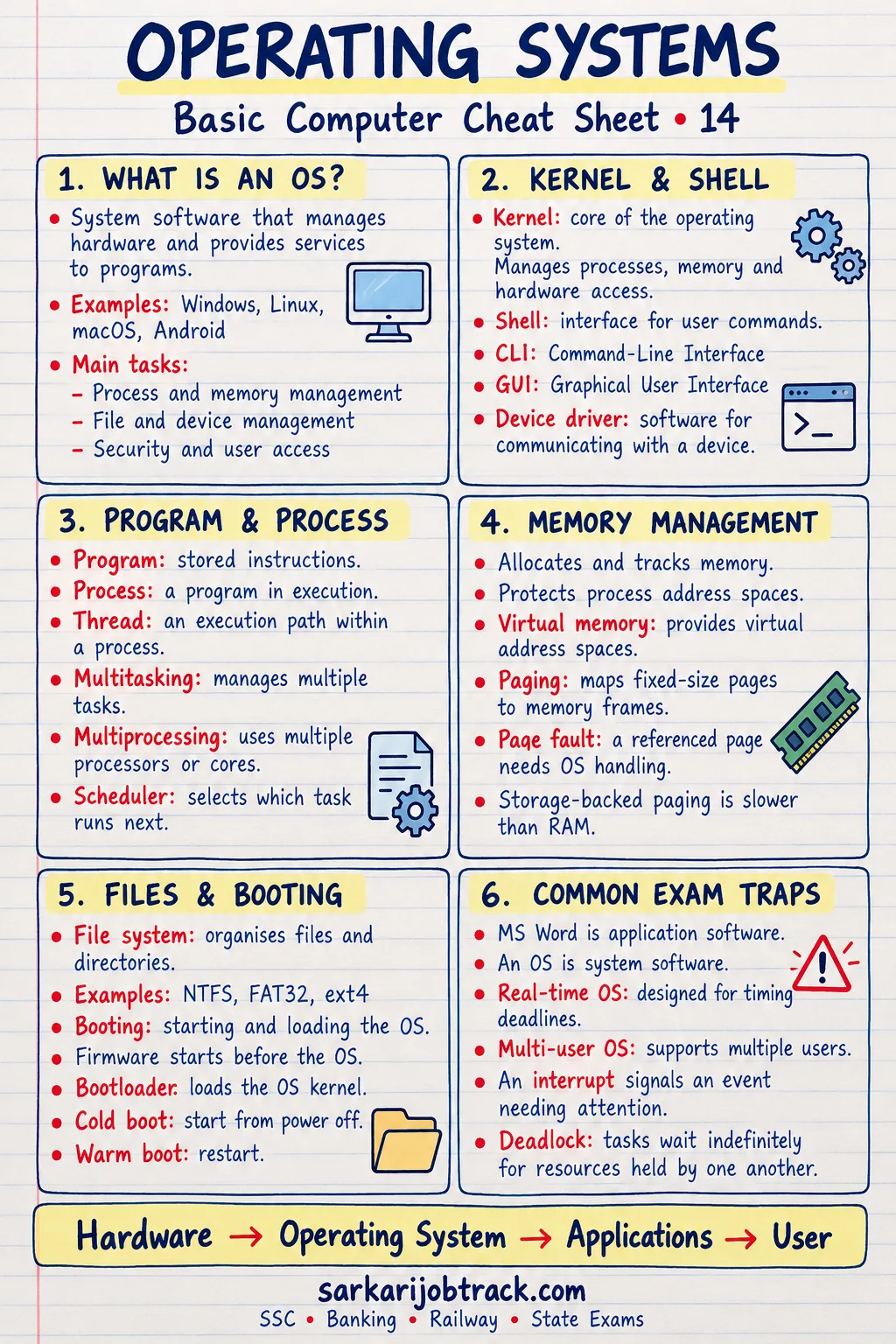
Short on time? Revise with the Operating Systems cheat sheet
Already confident? Skip to practice: Operating Systems quiz
Before this: you should know the difference between system and application software, from the Computer Fundamentals lesson, and how the BIOS or UEFI firmware starts the machine, from the Computer Hardware lesson. This lesson picks up where the firmware hands over.
What an operating system is
NCERT calls the operating system "the most basic system software, without which other software cannot work". NCERT and IGNOU both call it a resource manager: many programs, and sometimes many users, want the CPU, RAM, disk, network and devices at once, and the OS decides who gets what, and when.
Two points are tested:
- A computer cannot be used without an OS, but it can be used without application software. No word processor? It still works. No OS? It does not.
- An OS is not an application. Windows, Linux, macOS, Android and iOS are operating systems. MS Word or a photo editor is application software that runs on one.
What an operating system does
| Function | What the OS does |
|---|---|
| Process management | A program in execution is a process. The OS creates, schedules and ends processes, and decides which gets the CPU and for how long. NIOS calls allocating CPU time "the most critical task" of the OS. |
| Memory management | It gives memory to running processes, takes it back when they finish, and tracks which parts of main memory are free. |
| File management | It creates, updates, deletes and protects files on secondary storage, and organises them in folders (directories). |
| Device management | It controls input and output devices through each device's driver, and lets users configure them. |
| Security | It stops users from opening files that belong to others and have not been shared, and stops programs interfering with one another. |
| User interface | It gives the user a way to give commands: typed commands, windows and icons, or touch. |
NIOS adds that each process may use the CPU only for a limited time, perhaps a fraction of a second, before it must give it up until its next turn. That rapid turn-taking is what lets several programs run "at once" on one processor.
Example 1: Which job is not the OS's?
Question: Which of the following is NOT a task the operating system performs? (a) Deciding which running program gets the CPU next (b) Working out each student's percentage in a school's marks program (c) Keeping track of which parts of memory are free (d) Stopping one user from opening another user's private files
- Check each option against the table: (a) is process management, (c) memory management, (d) security.
- (b) is the user's own task. The marks program is application software; the OS only gives it memory and CPU time.
Answer: (b).
The principle: if it manages the machine's resources, it is the OS; if it produces what the user wanted, it is an application.
Booting: how the OS gets into memory
A program must be in main memory to run, but when the computer is switched on, the OS is still on the disk. Booting is starting the computer and loading the operating system into memory.
The firmware does the first part. NCERT describes the BIOS as the boot-up program held in ROM, memory that keeps its contents when the power is off; on today's PCs it is kept in flash, a rewritable type of ROM, and UEFI is its modern replacement. At OS level, the order is:
- Power on. The firmware starts running.
- POST. The firmware's Power-On Self-Test checks the processor, memory and other key hardware.
- Boot loader. The firmware loads the operating system's boot loader, the start-up program that loads the operating system into main memory, and hands over control. NCERT counts this start-up program among what ROM holds, so a question asking where the bootstrap loader is stored wants ROM.
- The OS takes over. The kernel, the core of the OS, now resides in memory and runs the machine until shut-down.
There are two kinds of boot:
- Cold boot: starting the computer from a completely powered-off state.
- Warm boot: restarting a computer that is already on, without cutting the power, as when you choose Restart. Lenovo notes warm boots are typically faster.
Example 2: Putting start-up in order
Question: When a switched-off desktop is turned on: P, the boot loader runs; Q, the Power-On Self-Test checks the hardware; R, the operating system takes control; S, the firmware starts running. What is the correct order? (a) Q, S, P, R (b) S, P, Q, R (c) P, S, Q, R (d) S, Q, P, R
- Nothing runs before the firmware, so S is first: (a) and (c) are out.
- The firmware checks the hardware before loading anything, so Q comes before P: (b) is out.
- The boot loader then loads the OS, which takes control: P, then R.
Answer: (d) S, Q, P, R.
Inside the OS: kernel, shell and device drivers
IGNOU's Linux case study pictures four layers: hardware at the bottom, then the kernel, then the shell, then the applications.
- Kernel. The core of the OS, resident in memory and working directly with the hardware. IGNOU lists its jobs as memory management, process management, working with device drivers, and handling programs' requests for service.
- Shell. The layer between the user and the kernel: it takes commands, passes them to the kernel and returns the results. IGNOU calls the command interpreter "the primary interface between the user and the rest of the system", and notes a shell can be a command line or a graphical interface.
- Device driver. Microsoft defines a driver as "a software component that lets the operating system and a device communicate"; it is usually written by the device's manufacturer. NCERT compares it to a language translator between the OS and the device. Without the right driver, a printer or graphics card will not work properly.
Example 3: Match the part to its job
Question: Parts: P, kernel; Q, shell; R, device driver. Jobs: 1, takes the user's commands and passes them on; 2, lets the OS communicate with one particular device; 3, the core that manages memory and processes. Which matching is correct? (a) P-1, Q-3, R-2 (b) P-2, Q-1, R-3 (c) P-3, Q-1, R-2 (d) P-3, Q-2, R-1
- The core managing memory and processes is the kernel: P-3. Only (c) and (d) remain.
- Taking the user's commands is the shell's job: Q-1. Only (c) has it.
- Check the last pair: R, the driver, lets the OS talk to one device: R-2.
Answer: (c) P-3, Q-1, R-2.
The principle: kernel = core, next to the hardware; shell = outer layer, next to the user; driver = translator for one device.
Types of operating system
IGNOU first sorts operating systems by how the user interacts with a running job, into batch, time-sharing and real-time, then adds types defined by the hardware or network.
| Type | How it works |
|---|---|
| Batch | Jobs are collected into a batch and queued, then run without the user. The user has no interaction with a job while it runs. |
| Time-sharing (multi-user) | Many users at their own terminals use one computer at once. The OS shares the processor and memory among them, and each user interacts with their program as it runs. |
| Multiprogramming | More than one program is held in main memory at the same time. Every time-sharing system is a multiprogramming system. |
| Multitasking | The OS runs more than one task at once: typing in a word processor while a document prints, for instance. Even a single processor can do this, by switching between the tasks so quickly that they seem to run together. |
| Multiprocessing | The hardware has more than one processor, used together. |
| Real-time (RTOS) | Built for jobs where the response must come in time to prevent error or disaster, such as controlling machinery, industrial systems, robots and satellites. |
| Network | Each computer runs its own OS, and users can log in to other machines and copy files; they know there are several computers. |
| Distributed | Several connected computers share the work but look to the user like one. |
| Embedded and mobile | An OS built into a device: phones, point-of-sale terminals, robot controllers. Smartphones run mobile operating systems such as Android and iOS. |
Operating systems are also classed as single-user or multi-user, and single-tasking or multitasking. IGNOU notes that a multi-user system must be multitasking.
Example 4: Naming the type from the situation
Question: A factory machine is controlled by a computer that must react to a sensor signal within a fixed time, every time; a late response could damage the machine. Which type of operating system does it need? (a) Batch processing (b) Time-sharing (c) Real-time (d) Network
- Within a fixed time, every time defines a real-time OS; IGNOU names machinery and industrial systems among its uses.
- Batch runs queued jobs with no interaction; time-sharing serves users at terminals, with a response of up to a few seconds; a network OS shares files between computers.
Answer: (c) Real-time.
Example 5: Many processors, one OS
Question: A server has four separate processors that work together under one operating system. Which term describes this hardware arrangement? (a) Multitasking (b) Batch processing (c) Time-sharing (d) Multiprocessing
- Count the processors. Multitasking is about how many tasks run, which even one processor can manage by switching between them; time-sharing is about many users sharing one computer. Neither term says how many processors there are.
- Batch processing is about queued jobs, not the number of processors.
- More than one processor used together is multiprocessing.
Answer: (d) Multiprocessing.
The principle: multitasking = many tasks (possible even on one CPU); multiprocessing = many CPUs; multiprogramming = many programs in memory; multi-user = many users.
How you talk to the OS: CLI and GUI
- Command line interface (CLI). You type commands at a prompt and must remember them; the keyboard is the main input device. NIOS notes a CLI needs very few system resources, and some advanced tasks can be done only through commands. MS-DOS and Unix are the textbook examples.
- Graphical user interface (GUI). You work through windows, icons, menus and a pointer, with the mouse and keyboard. It is easier for new users but needs more resources. Windows, macOS and Linux desktops such as Ubuntu are examples.
- Touch and voice. Android and iOS take touch input, and NCERT notes that modern operating systems also accept voice commands.
NCERT records that the PC became popular when GUI-based operating systems, by Microsoft and others, replaced computers with only a command line, such as UNIX or DOS.
Common operating systems
| OS | What to know |
|---|---|
| MS-DOS | Microsoft's single-user, command-line Disk Operating System, the OS of the IBM PC (1981) and its compatibles. IGNOU calls it the underlying control program for Windows 3.1, 95, 98 and ME. |
| Windows | Microsoft's GUI operating system for PCs; several programs can be open at once. NCERT lists it as proprietary software. |
| Unix | A multi-user, multitasking OS developed in the 1960s, made up of the kernel, the file system and the shell. NIOS lists Mac OS X among its versions. |
| Linux | A clone of Unix written from scratch by Linus Torvalds with help from developers across the internet (kernel.org). It is open source: its source code is available for anyone to study and modify, and the kernel is released under the GNU General Public License version 2. It comes in distributions such as Red Hat, SuSE and Ubuntu. |
| macOS | Apple's operating system for its Mac computers. |
| Android | An open-source mobile OS owned by Google, built on a modified Linux kernel: Android's documentation says its kernel is based on a Long Term Supported Linux kernel combined with Android-specific patches. |
| iOS | Apple's multi-touch, multitasking mobile OS for the iPhone (iPads now run Apple's iPadOS), usable only on Apple's own products. Its kernel, XNU, comes from Apple's Darwin system, which has BSD Unix roots. |
NCERT defines Free and Open Source Software (FOSS) as software whose source code is given freely to the public, with Ubuntu as its OS example; proprietary software must be bought from the vendor who holds the copyright, such as Microsoft Windows.
Example 6: Mobile operating systems
Question: Which statement is true? (a) iOS can be installed on phones made by any company. (b) Android is built on a modified Linux kernel. (c) The source code of Linux is kept secret by one company. (d) Windows is free and open-source software.
- (a) is false: iOS runs only on Apple's products.
- (c) and (d) are reversed: Linux is open source; Windows is proprietary.
Answer: (b).
Windows tools the exam names
- Task Manager shows running apps and background processes with the CPU, memory, disk and network each uses, and its End task button closes a program that has stopped responding. Ctrl + Shift + Esc opens it; Ctrl + Alt + Delete opens a security screen that also offers it.
- Recycle Bin. Deleting a file normally moves it to the Recycle Bin, from which it can be restored to its original folder. Shift + Delete deletes it permanently, without the Recycle Bin.
- Defragmentation. NIOS explains that a large file may be stored in scattered pieces on the disk. Defragmenting, in Microsoft's words, reorganises the files "so that they are all lined up and easier for the drive to read". Windows does it with its drive-optimisation tool, by default once a week; SSDs are "trimmed" instead.
Example 7: Which pairing is wrong?
Question: Which pairing of a Windows feature and its job is WRONG? (a) Task Manager: close a program that has stopped responding (b) Recycle Bin: hold files deleted with Shift + Delete (c) Drive optimisation: defragment a hard disk (d) Ctrl + Shift + Esc: open Task Manager
- (a), (c) and (d) match Microsoft's descriptions.
- Shift + Delete deletes a file without sending it to the Recycle Bin, so (b) is wrong.
Answer: (b).
When processes get stuck: deadlock
A process must request a resource, use it, then release it. IGNOU's example: process P1 holds the tape drive and asks for the plotter, while P2 holds the plotter and asks for the tape drive. Neither request can be granted and neither will let go. That is a deadlock: each process waits for a resource held by another, so none can proceed.
Two terms offered beside it mean something else. In thrashing, the system spends more time fetching pages of programs from disk into memory (handling page faults) than doing useful work. Spooling puts the input or output of a slow device, such as a printer, on a faster disk so the CPU need not wait for the device.
Look-alikes: telling them apart
| These terms | How to tell them apart |
|---|---|
| Kernel vs shell | Kernel: the core, next to the hardware. Shell: the outer layer that takes the user's commands. |
| Driver vs utility | A driver lets the OS talk to one device; a utility maintains the computer (defragmenter, antivirus). |
| Cold vs warm boot | Cold: from fully switched off. Warm: restart with the power on. |
| Multitasking vs multiprocessing | Multitasking: several tasks at once, possible even on one CPU. Multiprocessing: more than one CPU. |
| Multiprogramming vs multitasking | Multiprogramming: several programs held in main memory at the same time. Multitasking: several tasks run so that they appear to run at the same time. |
| Time-sharing vs batch | Time-sharing: many users interact at once. Batch: queued jobs, no interaction. |
| Network vs distributed OS | Network: users see several computers. Distributed: several computers look like one. |
| CLI vs GUI | CLI: typed commands (MS-DOS). GUI: windows, icons and pointer (Windows). |
| Deadlock vs thrashing | Deadlock: processes wait on each other. Thrashing: too much time spent fetching pages. |
In the exam
Computer Knowledge is a named module in SSC CGL Tier-II and SSC CHSL, and part of General Awareness in RRB NTPC. Operating-system questions come in a few shapes:
- "Which is (or is NOT) an operating system / an OS function?" How to spot it: sort each option into "manages the machine" or "does the user's job".
- "What is X called?" A one-line definition: the core of the OS, a restart with the power on, two processes waiting on each other. How to spot it: find the stem word only one option fits: core (kernel), device (driver), restart (warm boot), each other (deadlock), many users (time-sharing).
- "Which OS is open source / mobile / command-line / built on Linux?" How to spot it: Linux is open source; Android and iOS are mobile; MS-DOS is command-line; Android is built on the Linux kernel.
Common mistakes
- Calling MS Word or Excel an operating system. They are applications that run on one.
- Mixing up kernel and shell. The kernel is the core; the shell is the layer the user meets.
- Calling a restart a cold boot. Restarting with the power on is a warm boot.
- Thinking Shift + Delete sends a file to the Recycle Bin. It bypasses the bin.
At a glance
- OS = system software that manages resources and gives the user an interface.
- Functions: process, memory, file and device management; security; user interface. Process = program in execution.
- Booting: firmware → POST → boot loader → OS. BIOS in ROM (flash today). Cold boot from off; warm boot = restart.
- Kernel = core; shell = command interpreter; driver = OS-to-device translator.
- Types: batch, time-sharing, multitasking (many tasks, even on one CPU), multiprocessing (many CPUs), real-time, network, distributed, embedded/mobile.
- Linux = open source (Linus Torvalds); Android = mobile, Linux kernel; iOS = Apple mobile; Windows = proprietary.
- Task Manager (Ctrl + Shift + Esc) ends stuck programs; Recycle Bin holds deleted files; defragmenting lines up scattered file pieces.
Next
The next lessons in the Basic Computer series cover applications that run on the operating system: MS Word, MS Excel and MS PowerPoint. Until they are up, revise with the MS Word cheat sheet, the MS Excel cheat sheet and the MS PowerPoint cheat sheet, or browse every topic under Basic Computer.
Ready to test this lesson? Take the Operating Systems quiz
How this was made: Drafted with AI assistance; every answer re-solved by a separate check that had not seen the key; every fact checked against the source it cites.