
Input and Output Devices: Sort Any Device by the Way Its Data Flows
Learn to sort any device as input, output or both by asking which way its data flows, match OCR, OMR, MICR, barcode and QR readers to their jobs, tell impact from non-impact printers, and read a monitor's resolution, dot pitch and refresh rate and a camera's megapixels, through worked exam-style questions, a look-alike table and a revision list.
By the end of this lesson you will be able to sort any device into input, output or both by asking one question: which way does the data flow? Into the computer is input; out of it to you is output; both ways is an input-output device. You will also be able to match the special readers (OCR, OMR, MICR, barcode and QR) to their jobs, tell impact printers from non-impact ones, and read the numbers on a monitor or a camera: resolution, dot pitch, refresh rate and megapixels.
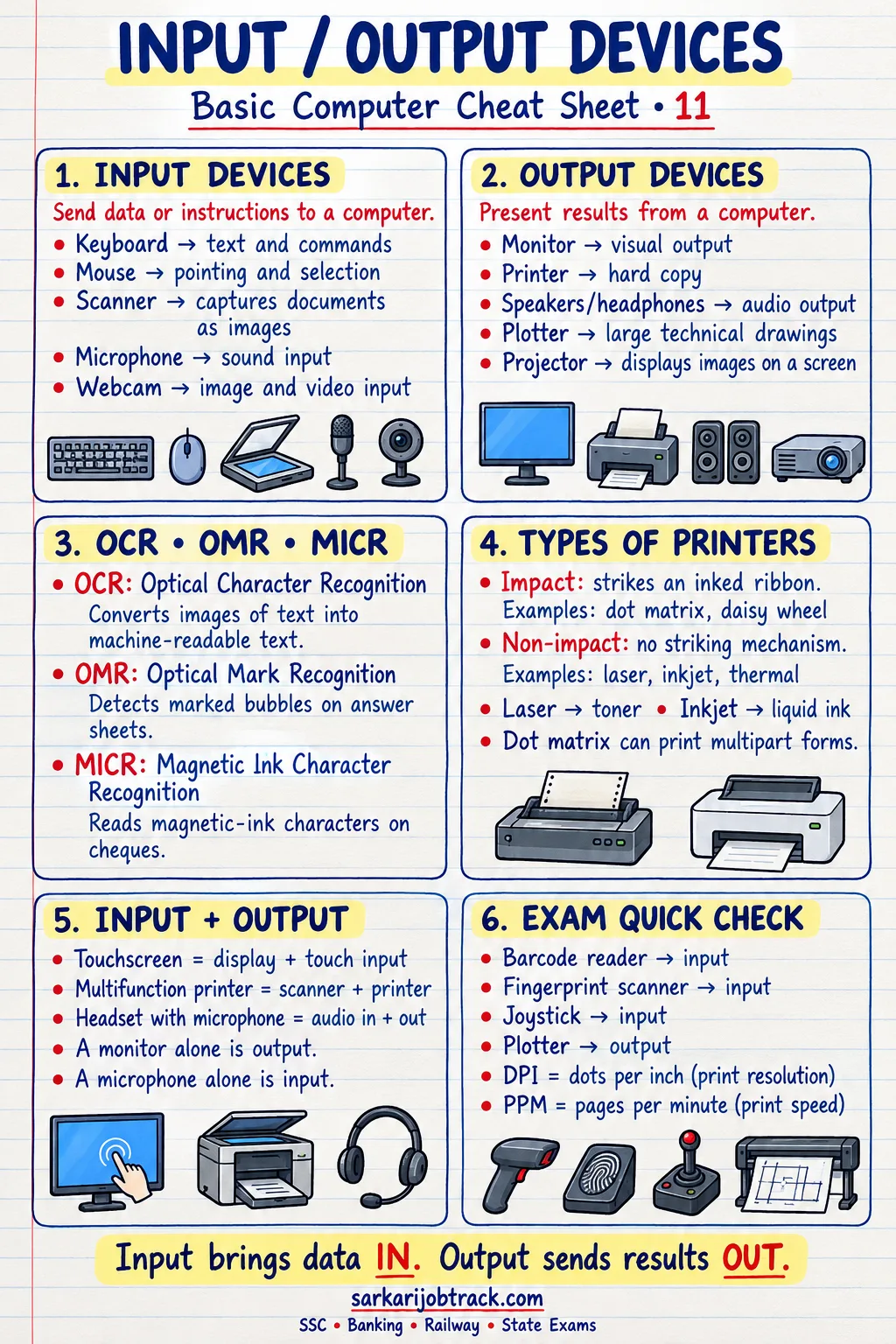
Short on time? Revise with the Input / Output Devices cheat sheet
Already confident? Skip to practice: Input / Output Devices quiz
Before this: you should know the input–process–output cycle from the Computer Fundamentals lesson. The devices here sit at the two ends of that cycle. They plug into the ports covered in the Computer Hardware lesson.
Input, output, or both
NCERT gives the two definitions:
- An input device sends data and control signals into the computer. It converts what you give it into a digital form the computer can accept.
- An output device receives data from the computer for display or physical production. It converts digital information into a form people can understand.
So the test is to follow the data. A scanner reads a page into the computer, so it is input, even though you later see the picture on screen. A printer puts data out onto paper, so it is output. A device that does both, such as a touchscreen or a headset, is an input-output device.
Input devices
Typing: the keyboard
The keyboard is the most common input device. It is laid out like a typewriter, with extra keys. The usual layout is QWERTY, named after the first six letters at the top left of the letter keys.
Key counts vary between keyboards. NIOS describes the common QWERTY keyboard as having 104 keys, while NCERT notes that the standard US keyboard of 1986 had 101. The function keys run F1 to F12 across the top, so there are usually twelve of them. Many keyboards also have a numeric keypad for entering numbers quickly, and specially designed braille keyboards help visually impaired users enter data.
Pointing devices
A pointing device moves the pointer (cursor) on the screen.
| Device | How it works | Typical use |
|---|---|---|
| Mouse | rolled over a flat surface; ball, optical (LED) and laser types | everyday pointing and clicking |
| Touchpad | you drag a finger across a flat pad; buttons below it click | laptops, in place of a mouse |
| Trackball | the device stays still and you roll the ball with your fingers or palm | an alternative to a mouse |
| Joystick | a vertical stick that moves in any direction, with a button on top | video games, training simulators, robots |
| Light pen | a light-sensitive tip detects light from the screen, so you point and draw directly on the screen | design work by engineers and artists |
| Graphics tablet (digitiser) | a pressure-sensitive stylus moves over an electronic writing area | drawing and sketching by hand |
Example 1: The odd one out
Question: Which of these is NOT a pointing device? (a) Trackball (b) Barcode reader (c) Touchpad (d) Light pen
- A pointing device moves the pointer on the screen. A trackball, a touchpad and a light pen all do this.
- A barcode reader reads a printed code into the computer. It is an input device, but it never moves the pointer.
Answer: (b) Barcode reader.
The principle: "input device" is the bigger family. Pointing devices are only the members that move the pointer.
Scanners and the special readers
A scanner works like a photocopier. It captures a picture or a page of text and converts it into a digital image the computer can store. Its quality depends on its resolution, measured in dots per inch (DPI): the higher the DPI, the finer the scanned image.
A scanned page is only a picture of the text. NIOS points out that you cannot edit the words in it directly; for that, you need OCR. Some readers go further and read a particular kind of mark or code on purpose:
| Reader | Full form | What it reads | Where you meet it |
|---|---|---|---|
| OCR | Optical Character Recognition | the letters in a scanned image, turned into editable text | turning books and magazines into digital text |
| OMR | Optical Mark Recognition (or Reader); also called a mark sense reader | only whether a mark is present at fixed places on a form | bubble answer sheets for MCQ exams, questionnaires |
| MICR | Magnetic Ink Character Recognition (or Reader) | characters printed in special magnetic ink, in a special font | the code line along the bottom of a bank cheque (cheque number and MICR code) |
| Barcode reader | — | vertical lines of different thickness and spacing, read as a number | shop billing, library books |
| QR code reader | Quick Response code | a two-dimensional code that holds more data, such as a website address or phone number | read by a phone camera with suitable software |
A barcode is one-dimensional and a QR code is two-dimensional, which is why a QR code can store more.
Example 2: Matching the reader to the job
Question: Which pairing of reader and job is WRONG? (a) OMR — checking the darkened bubbles on an exam answer sheet (b) OCR — turning a scanned book page into text you can edit (c) MICR — reading the price code printed on a packet of biscuits (d) QR code reader — reading a square two-dimensional code with a phone camera
- OMR checks bubble marks, OCR makes scanned text editable, and a phone camera can read a QR code. Pairs (a), (b) and (d) are right.
- MICR reads characters printed in magnetic ink: the code line along the bottom of a bank cheque. A packet's price code is a barcode, read by a barcode reader. Pair (c) is wrong.
Answer: (c).
Sound, pictures and video
- Microphone — inputs voice and other sound. Sound is analogue; the microphone's signal is converted into digital form so it can be stored or played back. With speech-recognition software, spoken words can become text or commands.
- Digital camera — takes pictures and videos in digital form, stores them in its own memory and transfers them to a computer. Its resolution is measured in megapixels (see below).
- Webcam — a compact, cheaper version of a digital camera with no internal memory. It feeds live video into the computer for video calls, and many laptops have one built in.
Touch and identity
- Touch screen — you operate it by touching the display with a finger or a stylus. Information kiosks at railway stations and bank ATMs use them. NCERT lists it as an input device, and the touch is the input part. But it is also a display, so it does both (see Devices that do both).
- Biometric sensor — identifies a person by unique physical features, such as fingerprints or the patterns of the retina or iris, to verify who the user is.
Example 3: Only input
Question: Which group contains ONLY input devices? (a) Webcam, speaker, keyboard (b) Projector, joystick, microphone (c) Mouse, plotter, biometric sensor (d) Scanner, microphone, biometric sensor
- Follow the data. A speaker, a projector and a plotter all produce output, so groups (a), (b) and (c) each contain an output device.
- A scanner reads a page in, a microphone takes sound in, and a biometric sensor reads a fingerprint in. All three are input.
Answer: (d).
Output devices
NCERT sorts output into three kinds:
- Soft copy — output on a screen. It exists electronically, is shown for a while, and leaves no permanent record. A monitor gives soft copy.
- Hard copy — output on paper that you can hold and keep. Printers and plotters give hard copy.
- Sound output — from speakers.
The monitor
The monitor, or visual display unit (VDU), shows text, graphics and video. The older CRT (cathode ray tube) monitor is large, heavy and uses more electricity. Flat-panel monitors are thinner and lighter and use less power: LCD (liquid crystal display), LED (an LCD lit by light-emitting diodes behind it), OLED (organic LED) and plasma. Screen size is measured diagonally, in inches.
Reading a display's numbers
A pixel (picture element) is the smallest unit of a digital image or display: a tiny dot of colour. Each measure below describes the pixels in a different way.
| Measure | What it means | How it is written | Better when |
|---|---|---|---|
| Resolution | the number of pixels across and down the screen | width × height, such as 1920 × 1080 | higher, on the same size of screen: a sharper, clearer picture |
| Dot pitch | the distance between the centres of two neighbouring dots of the same colour (in practice, the spacing from one pixel to the next) | millimetres (mm) | smaller: the pixels sit closer and the image looks finer |
| Refresh rate | how many times per second the screen updates its picture | hertz (Hz); 60 Hz means 60 times a second | higher: smoother motion, less flicker |
Two other ratios turn up as wrong options. Aspect ratio is the width compared with the height, such as 16:9. Contrast ratio compares the brightest and darkest parts of the display, such as 1000:1.
Megapixels measure a camera's resolution. One megapixel is one million pixels, so a 12-megapixel camera records about 12 million pixels in each picture. To find the figure, multiply the width in pixels by the height and divide by one million.
Example 4: Which measure is in millimetres?
Question: A monitor's specification sheet gives one of its figures in millimetres (mm). Which measure is it most likely to be? (a) Resolution (b) Dot pitch (c) Refresh rate (d) Screen size
- Resolution is a count of pixels, written width × height, not a length.
- Refresh rate counts redraws per second, so it is in hertz.
- Screen size is measured diagonally, in inches.
- Dot pitch is the distance between neighbouring dots of the same colour, given in millimetres.
Answer: (b) Dot pitch.
Example 5: Counting megapixels
Question: A phone camera takes photos 4000 pixels wide and 3000 pixels high. About how many megapixels is that? (a) 7 (b) 1.2 (c) 12 (d) 120
- Total pixels = width × height = 4000 × 3000 = 12,000,000.
- One megapixel is one million pixels, so 12,000,000 ÷ 1,000,000 = 12.
- Option (a) comes from adding the sides instead of multiplying them: 4000 + 3000 = 7000, which is 7 thousand pixels, not 7 million. Options (b) and (d) have the right digits with the decimal point in the wrong place.
Answer: (c) 12 megapixels.
Printers
A printer's quality is its resolution in DPI. Its speed is given as characters per second (CPS), lines per minute (LPM) or pages per minute (PPM). By how they print, printers fall into two families.
Impact printers make a mark by striking: a head or needle hits an inked ribbon against the paper.
- Dot-matrix printer — small pins in the print head (commonly 9, or 24 for better quality) strike the ribbon, forming each letter from a grid of dots. Print quality is poor and it is noisy, but it is cheap to run and can print carbon copies, which is why shop cash counters use it.
- Line printer — uses a similar method but prints a whole line at a time, so it is fast.
- Daisy-wheel printer — an older impact printer whose characters sit around the edge of a rotating wheel. It turns the wanted character in front of the inked ribbon and strikes it against the paper, giving clear, high-quality text.
Non-impact printers do not strike the paper, so they are quiet.
- Inkjet printer — sprays tiny droplets of liquid ink from microscopic nozzles in the print head, using cyan, magenta, yellow and black ink for colour. It gives good photo prints, but the ink cartridges are costly over time.
- Laser printer — a laser beam draws the page on a drum, powdered toner sticks to the marked areas, and heat fuses the toner onto the paper. Because the whole page is formed on the drum first, laser printers are also called page printers. They are fast, and their speed is rated in PPM.
- Thermal printer — heats special heat-sensitive paper, which turns black where it is heated. It is used for receipts, for example in ATMs, and for labels.
Example 6: The wrong description
Question: Which statement about printers is NOT correct? (a) A laser printer fuses toner powder onto the paper with heat. (b) A thermal printer strikes the paper through an inked ribbon, like a dot-matrix printer. (c) An inkjet printer sprays droplets of liquid ink from tiny nozzles. (d) A dot-matrix printer can print carbon copies.
- Striking the paper through an inked ribbon is the impact method of the dot-matrix printer.
- A thermal printer is non-impact: it prints with heat and does not strike the paper. Statements (a), (c) and (d) are correct.
Answer: (b).
The principle: sort a printer by whether it strikes the paper. Impact printers, such as dot-matrix and line printers, strike an inked ribbon against the paper; inkjet, laser and thermal printers do not.
Plotter, speaker and projector
- Plotter — produces hard copy of graphs and designs by moving pens across the paper on an arm. It suits large drawings that a normal printer cannot handle, such as construction maps and engineering drawings made with CAD software. Plotters draw continuous lines rather than building an image from dots. NCERT names two types: the drum (roller) plotter and the flatbed (table) plotter.
- Speaker — gives sound output. A diaphragm inside moves back and forth with the electrical signal from the computer to make sound. Headphones are output devices too.
- Projector — shows the computer's output on a large screen or wall. In an LCD projector, a bright light shines through the image and a lens magnifies and focuses it, so a whole classroom can see it at once.
Devices that do both
- Touchscreen — NCERT lists it with input devices, and the touch-sensitive layer on its surface is the input part. But the same panel is also the display that shows you the output. So when a question asks for a device that does both, the touchscreen is the answer.
- Headset — earphones (output) together with a microphone (input), so you can listen and speak.
Example 7: Why a headset counts twice
Question: A call-centre worker wears one device that lets them hear the caller and speak back. Why is it classed as an input-output device? (a) It is worn on the head. (b) It has a volume control. (c) It can work without wires. (d) Its earphones give output and its microphone takes input.
- A device is input-output only if data flows both ways through it. Options (a), (b) and (c) say nothing about the direction of the data.
- The earphones bring sound out to the worker (output), and the microphone carries the worker's voice in (input).
Answer: (d).
Look-alikes: telling them apart
| These two | How they differ |
|---|---|
| OCR vs OMR | OCR reads letters into editable text; OMR only detects whether a mark is there. |
| Barcode vs QR code | a barcode is one-dimensional lines; a QR code is a two-dimensional pattern and holds more. |
| Scanner vs printer | a scanner takes paper into the computer (input); a printer puts data onto paper (output). |
| Soft copy vs hard copy | soft copy is on screen and temporary; hard copy is on paper and permanent. |
| Plotter vs printer | both give hard copy; a plotter draws large line drawings with pens. |
| Light pen vs graphics tablet | a light pen works on the screen itself; a graphics tablet is a separate pad with a stylus. |
| Resolution vs dot pitch | resolution counts the pixels (more is sharper on the same size of screen); dot pitch measures the gap between them (less is sharper). |
| DPI vs PPM | DPI is print or scan quality; PPM is printing speed. |
In the exam
Computer Knowledge is a named module in SSC CGL Tier-II and SSC CHSL, and part of General Awareness in RRB NTPC. Questions on this topic come in a few shapes:
- "Which of the following is (NOT) an input / output device?" How to spot it: follow the data for each option. Watch for the scanner, which is input even though it handles pictures.
- "Which technology or device is used for …?" How to spot it: find the one word in the stem only one device fits. Cheque → MICR. Bubbles → OMR. Editable → OCR. Label → barcode. Drawings → plotter. Game → joystick.
- "What is it called, or what is it measured in?" How to spot it: learn each measure with its unit: refresh rate in Hz, dot pitch in mm, resolution in pixels (width × height), a camera in megapixels, print quality in DPI, print speed in PPM.
Common mistakes
- Calling a scanner an output device. It reads paper into the computer, so it is input.
- Swapping OCR and OMR. OCR reads letters; OMR only sees whether a bubble is filled.
- Putting the inkjet or the laser printer among impact printers. Impact printers, such as dot-matrix and line printers, strike an inked ribbon against the paper. Inkjet, laser and thermal printers never strike the paper, so they are non-impact.
- Thinking a bigger dot pitch is better. A smaller dot pitch gives the finer image.
- Giving refresh rate the job of sharpness. Refresh rate is how often the picture is redrawn; sharpness comes from resolution and dot pitch.
- Adding instead of multiplying for megapixels. Multiply width by height, then divide by one million.
At a glance
- Input: data goes in. Output: results come out. Both: touchscreen, headset.
- Keyboard: QWERTY; function keys F1–F12 (twelve). Pointing devices: mouse, touchpad, trackball, joystick, light pen, graphics tablet.
- Scanner: paper → digital image; quality in DPI. OCR: text → editable. OMR: bubble marks. MICR: the magnetic-ink code line on cheques. Barcode: 1-D lines. QR: 2-D, holds more.
- Microphone: sound in. Webcam: live video, no memory. Digital camera: resolution in megapixels. Biometric sensor: fingerprint, iris, retina.
- Soft copy: screen. Hard copy: paper (printer, plotter). Sound: speaker.
- Pixel = smallest dot. Resolution = width × height. Dot pitch = gap between same-colour dots (in practice, pixel to pixel), in mm; smaller is finer. Refresh rate in Hz. 1 megapixel = 1 million pixels.
- Impact: dot-matrix (carbon copies), line printer, daisy wheel. Non-impact: inkjet (nozzles), laser (toner, heat, page printer), thermal (heat-sensitive paper). DPI = quality, PPM = speed.
- Plotter: large engineering drawings with pens. Projector: big screen or wall.
Next
Next in the Basic Computer series come the Memory and Storage lesson, on where the computer keeps data and programs, and the Operating Systems lesson, on the software that runs the devices in this lesson. Every topic in the series is on the Basic Computer page.
Ready to test this lesson? Take the Input / Output Devices quiz
How this was made: Drafted with AI assistance; every answer re-solved by a separate check that had not seen the key; every fact checked against the source it cites.